Enhancements Release 7.64
August 23, 2026
Same great software, new name.
AgendaLink is now JustMeetings. Same product, same team, same features you rely on, just a new name that better reflects what we do.
No action needed on your end. All your data, settings, and integrations carry over automatically.
Misc
- Searching has been updating to return results based on ranking vs last modified. This drastically helps when looking for older information and what you were looking for ending up way at the bottom of the list.
- User Custom Fields now include all user roles including Board and Viewer
Enhancements Release 7.63
August 9, 2026
Attachments
- Whenever you upload a pdf the first thing it does now is check the file for any kind of password protection and if found prompts you to remove the protection before you can upload the file.
- You can now upload file types besides PDF to a topic's attachments or a meeting's supplemental materials and the software will convert the file to pdf and attach the pdf version automatically.
Misc
- Added code to provide a better experience with touch to scroll for Kiosk OS devices when browsing through the list of items within your consent.
- We now support importing agendas and topic information from PrimeGov. This import utility can be used to import meetings for in session / voting purposes and also utilized by our team for data archive importing.
Bug Fixes
- The title for a topic would appear twice on items with no report enabled on kiosk os devices when the topic is active during a meeting.
Enhancements Release 7.62
July 26, 2026
Topic Preview
User's can now preview the converted pdf form of their topic within the editor. To view the preview simply press the eye icon in the editor toolbar.
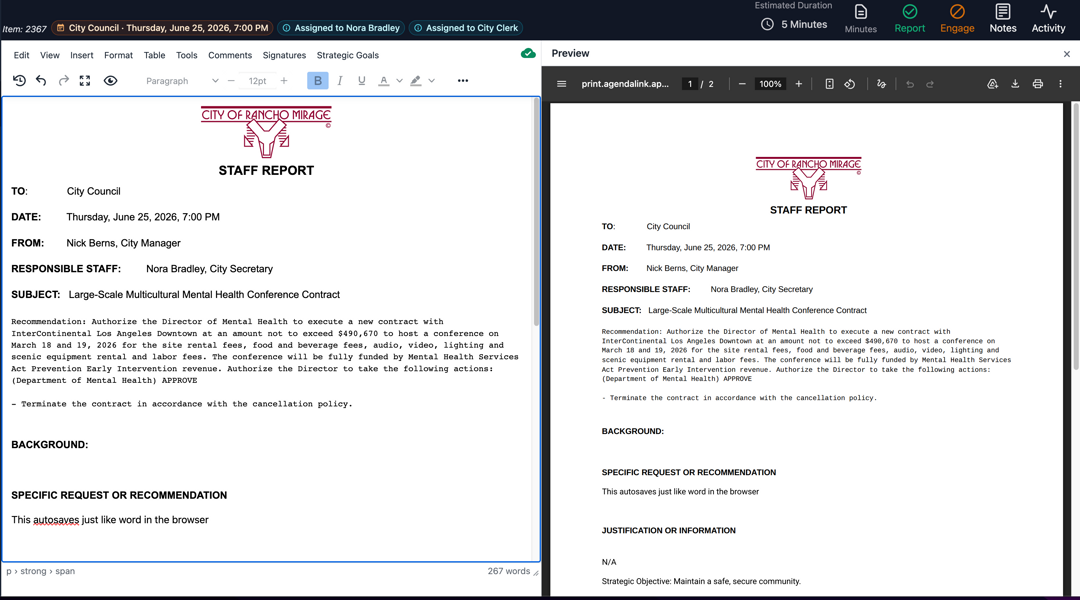
If you have the preview window open and make changes to the report, the preview window will tell you the content is old and provide you with a button to generate again.
You can also download or print the pdf from the preview window.
In addition, when looking at an agenda from the meeting building view there is a new pdf icon which will open the preview window for that topic.
Misc
- There is now a PDF icon near the top of the meeting building view that uses a PDF preview of the agenda similar to how the new topic preview works.
Bug Fixes
- Resolved an issue causing the "Add Secondary" dropdown option on approval steps to prematurely close before making a selection.
** What's Next ** We are currently in the process of testing attachment conversions which will allow you to upload pretty much any file type besides an audio or video file and we will convert it to pdf and attach it to the topic.
Enhancements Release 7.61
July 19, 2026
Mobile Search
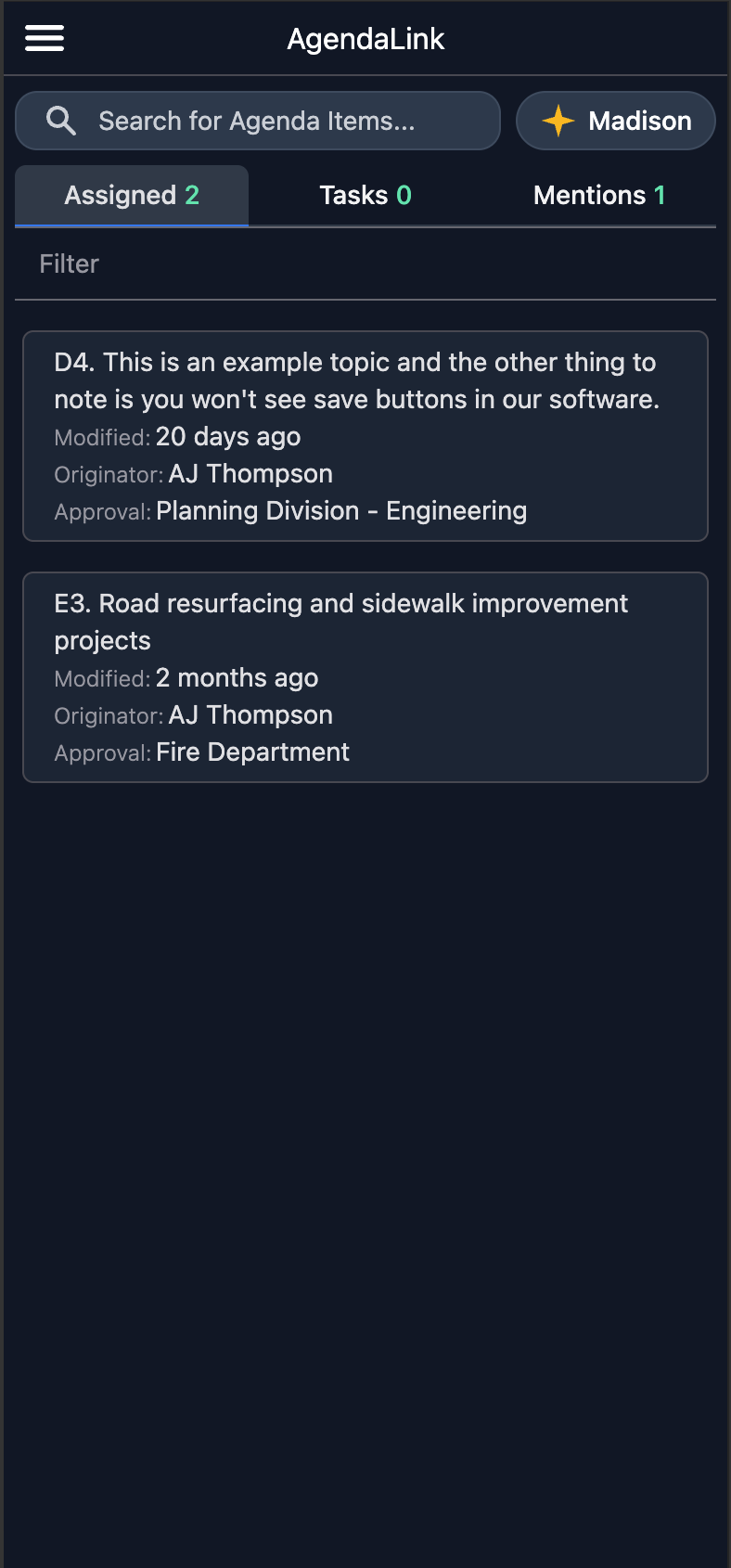
The mobile version of our application now supports the same search capbilities as desktop providing easy simple search on the go.
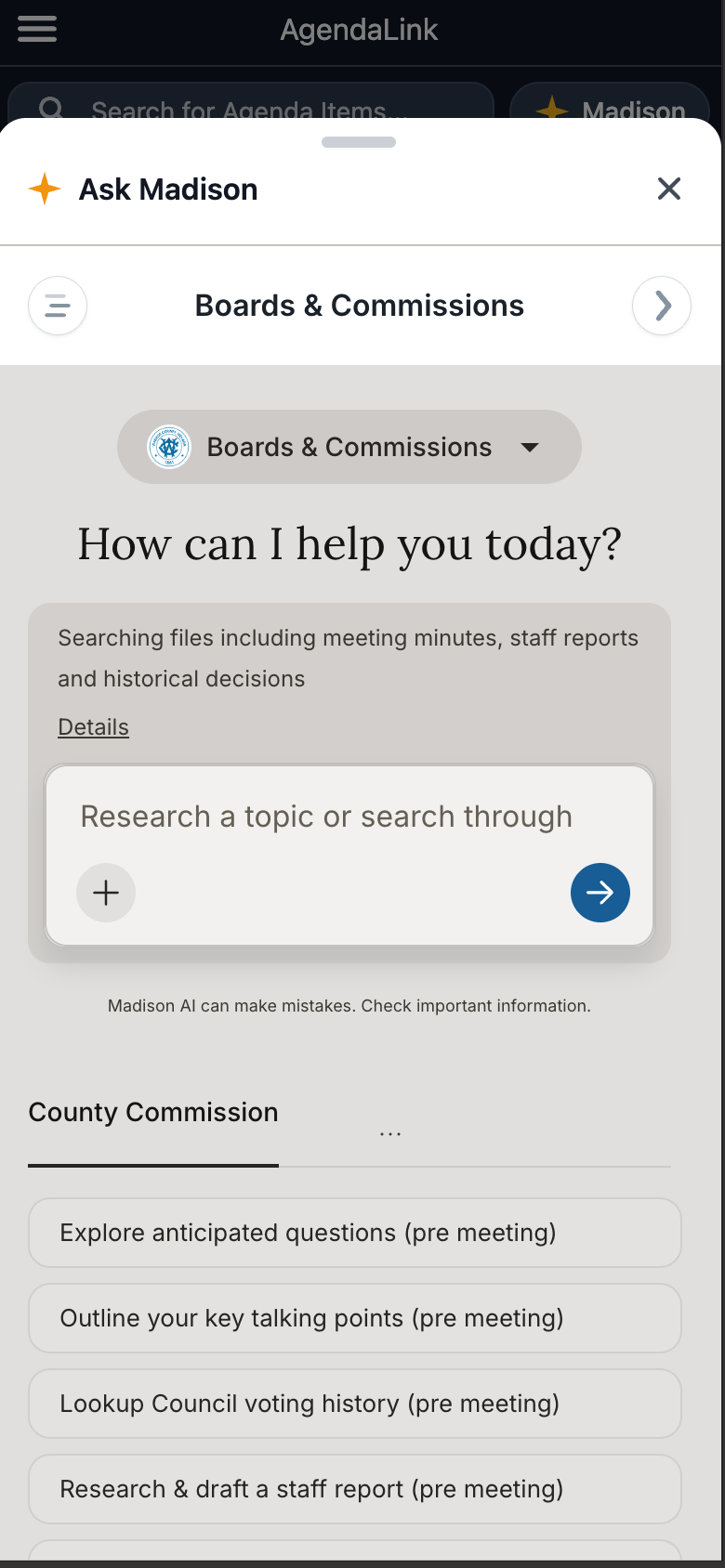
For our clients who use Madison AI, you will also have direct access to it on mobile now too.
Misc
- Updated file size limit on supplemental materials to 50mb (was 20mb) and also updated notifications so that if it's over the file size limit it tells you via an error message.
Bug Fixes
- If an approval process was completed it wouldn't allow users with permissions to roll back to a previous step.
- Video Player for VOD on mobile wasn't loading correctly
Enhancements Release 7.60
July 12, 2026
Approvals
We've redesigned the visuals for approval processes and also provided new simple approve and send back buttons.

- There is now a progress bar at the top showing which step it's currently, which steps have approved, and steps that were potentially skipped. Each step will also show how long it was at that stage.
- New simple "Approve" and "Send Back" buttons
- Higher level roles can still skip steps if desired by simply clicking on the stage they would like to jump to
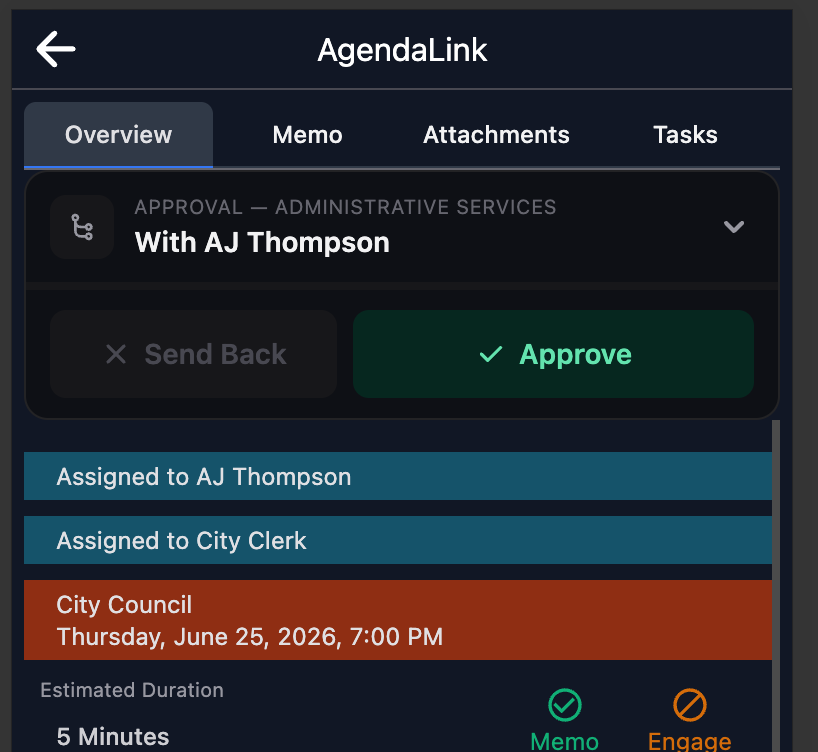
- On Mobile users can click the dropdown with who it's currently assigned to visualize the full approval process and jump to a specific step if desired. Otherwise simply press the approve or send back buttons.
** Please note that timespan will only begin working from this release on. Anything prior won't have this data to show **
Misc
- The info bar for topics with access to activity, notes, etc is now on every tab
- You can now click outside of the "Who's Submitting" popup for choosing who made the motion or second without choosing someone if you have accidentally pressed it.
- Minor UI Tweaks
Bug Fixes
- If using subgroups for your consent agenda, the "Remove Consent" option wasn't working properly in your minutes.
- Resolved an issue with applying timestamps on consent for topics if you were using subgroups in your consent agenda.
- Resolved a numbering issue if you have a group setup to accept public speaker registrations and were also using Running Total numbering schemes.
- if you added play by play to your "Consent" group it wouldn't actually show the play by play notes during the live meeting
- If removing a motion from a topic in minutes with more than 1 motion on occassion it could have resulted in the wrong one being removed.
- if using page breaks in our editor they were being ignored when converting digital to pdf
Maintenance Release 7.52
June 28, 2026
This release contains mostly behind the scenes code updates for things like optimizations, security patches, bugs, and things of that nature. It also contains more advanced tools for support purposes.
Public Portal
- The "Join" button that will show for a meeting where you have added a value to it's "Virtual Link" property will now show on the day of the meeting whether you run live a meeting in or software or not. Previously it wouldn't show up until you actually started a live meeting within JustMeetings.

Enhancments Release 7.51
June 21, 2026
Live Meetings
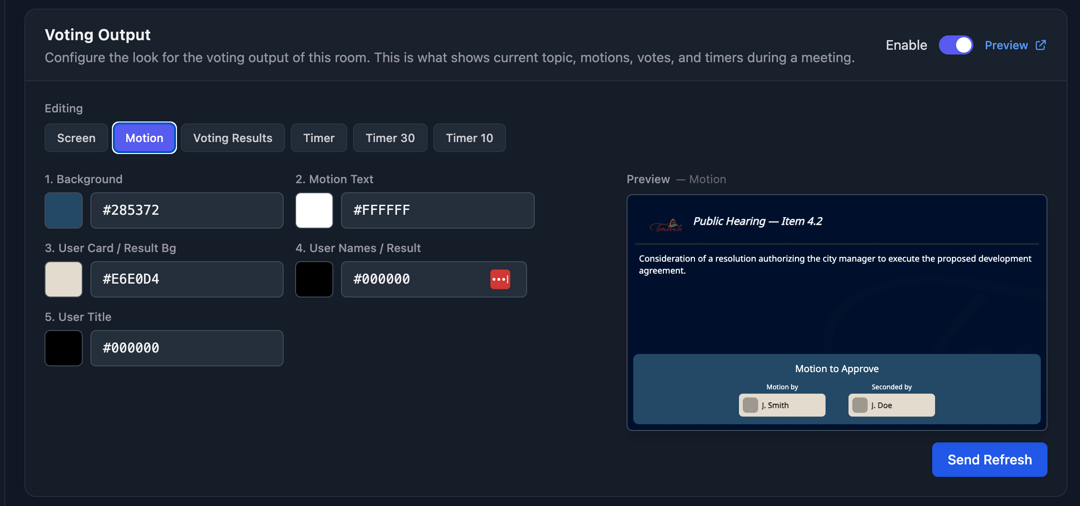
- You can now customize more colors in our voting output including motions, voting results, and timers.
Misc
- Search is now faster and more relevant as we've upgraded our search engine both in app and public portal to deliver quicker results and better matching, including support for typo-tolerant and partial-word searches. ** Please note for the public you must be using engage-v2 in your URL to have access to the new search ability **
- Minor UIX Improvements
- Squashed a few bugs
Backend
- We have upgraded the processing power on our database servers by 4x to better serve you especially with regards to search.
Enhancments Release 7.50
June 14, 2026
Search
- We've upgraded search functionality to include fuzzy lookups meaning if you misspell something or come within a character it will still return results.
Misc
- Rooms now have an option to enable/disable the ability to run live meetings within them. This was done to prevent real-time channels for rooms that don't require it. This also means that any meeting scheduled for a room that doesn't have the option turned on what show up in the meeting's section on your home page. (We have automatically enabled it for all rooms where clients currently utilize this capability)
- Minor UIX improvements
Bug Fixes
- If using Assigned Department, it would let a user create a topic without setting the department if you were creating a topic from the meeting building view.
- In rare instances if you generated a packet for a meeting more than once with files from Sharepoint it could potentially duplicate existing non-modified files to pdf for public consumption. We've tightened the coupling between converted and original.
Minor Release 7.42
June 7, 2026
Misc
- If using OnAir TV you can now preview the live stream within the room's settings at any time.
- You can now globally specify if a file linked from Sharepoint should be marked as public by default. To update the setting go to "Settings" -> "Integrations".
- You can now access your personal notes for a topic from the Unified inbox. There is a pencil icon just to the right of the star icon.
- Database / Query / Search Optimizations
Bug Fixes
- There could be a situation when using multiple custom wording motions where when you would start a vote it would show prior text vs the latest wording applied to the specific motion
- Star buttons weren't working on iPad for the unified inbox
- If you duplicated a topic that was on a meeting's agenda and chose to put it in the queue it would keep the database tie to the meeting it originated from.
Minor Release 7.41
May 31, 2026
Misc
- You can now "Star" items in your unified inbox
- This release contains behind the scenes optimizations for importing data from certain 3rd party vendors
- Minor updates to TownVoice
Feature Release 7.40
May 17, 2026
Madison AI
For users who utilize Madison AI you can now easily enable it inside of JustMeetings via "Settings" -> "Integrations". Simply turn it on and enter your madison url.

TownVoice
TownVoice Beta is now officially available. If you are interested in a try before you buy option, please reach out to sales@agendalink.app (Videos on how to setup, test, and use coming soon...)
Misc
- There is now a "Summarize Topic" button for every topic in your minutes that will automatically create a summary and inject it into the minutes for your topic via the captions. Once injected you can edit as needed.
- You can now duplicate an existing approval process
- UI Tweaks
Bug Fixes
- (7.40.2) Resolved potential pdf attachment caching issue. If you would view an attachment on a topic and then a user uploaded a new version with the same filename Acrobat wouldn't render the new version because it thought it was the exact same as the last one which it had cached.
Enhancements Release 7.36
May 10, 2026
Sharepoint
When attaching files from Sharepoint to a topic, it will now open in the desktop app vs in the browser when clicking on the file. We changed to this as a result of user's finding that some documents when created with Word on their computer would look malformed when opening with Word in the browser.
Misc
- Misc UI Improvements
Maintenance Release 7.35
May 2, 2026
Early Access
- This release contains early access availability for functionality coming in version 8 (Madison AI and TownVoice)
Bug Fixes
- If logging a member out of a live meeting the modal would keep popping up every 2 seconds
- Global search stopped animating to fullscreen with a topic open (7.35.3) - Board Managers using an iPad wouldn't see the option to begin a live meeting (7.35.3) - If a meeting manager refreshed their browser during a live meeting and the topic they were on had motions it wouldn't populate the existing motions on its own
Enhancements Release 7.34
April 26, 2026
Misc
- Play by Play now supports adding information to agenda groups
- Dynamic minutes motion injection now supports using a topic's description and sub item fields
- There is a new option that allows you automatically lock a topic when the approval process is marked as completed. "Settings" -> "Topics" -> "General Settings"
Bug Fixes
- If a topic was locked it would still allow changing the Report and Engage toggles in the overview tab of a topic's details (We also have updated the styling to signify they are locked and not editable)
Enhancements Release 7.33
April 19, 2026
Fonts
- added support for Roboto and Garamond fonts in board templates.
Misc
- This release contains a lot of behind the scenes updates in preparation for version 8 which will incorporate the new offering from C.D.S. called TownVoice. TownVoice is our virtual meeting platform designed specifically for use with public meetings like City Council meetings. Release is expected June 1, 2026.
Enhancements Release 7.32
April 5, 2026
Accessibility
- Our on-demand video player has been upgraded for WCAG 2.1 AA compliance including support of audio description tracks, keyboard navigation, and screen readers
- The transcript tab in our agenda player now follows along with the video highlighting as you watch
- More public portal WCAG 2.1 AA updates
** Please note to get all the benefits of the WCAG 2.1 AA compliance we have been implementing you must be using the version 2 of our public portal. If you are unsure which one you are currently using please reach out to our support team. Though it's farely simple to check.
If your iframe or link is pointing /engage/ it's the old version. Replace that aspect of the url with /engage-v2/
Bug Fixes
- Fixed issue that would allow creating multiple users with the same email address
Enhancements Release 7.31
Reports
This update provides major enhancements to the reports and how you can use them for agenda forecasting.
- You can now customize which data you want in the columns of the report (and re-order them)
- Added Assigned To and Approval as column options
- Added internal topic numbering as an option to display (if using it)
- You can now quickly type and filter through all the data in the report
- You can choose specific meetings to show in the report in real-time
- You can now click on any topic to access it's details including attachments for review
- Each topic has the ability to record follow up actions via the todo icon (if there is information the icon will be green signifying there are follow up actions for that topic)
Misc
- WCAG AA improvements for public portal v2 especially with regards to keyboard navigation and screen readers
- Misc Data Optimizations
- Misc UI Improvements
- Squashed a few minor bugs
Enhancements Release 7.30
March 22, 2026
Play by Play
Play by Play allows you to provide information on each topic that is available to staff and board members.
- Create information via the document icon in the meeting building view
- View the entire document via the Play by Play button
- Board members see any information typed up automatically when viewing agendas through the board portal
- During a live meeting board members have access to the play by play information per topic both when previewing agenda items and also while on a topic
Updated Lessons
- Videos - Chaptering
Bug Fixes
- When linking minutes from previous meetings to a new meeting's agenda it was incorrectly setting which meetings had linked minutes (7.30.2)
Enhancements Release 7.29
March 15, 2026
Video
You now have the ability to apply mass updates to video chapter markers making it much simpler to apply changes to all the chapter markers of a meeting.
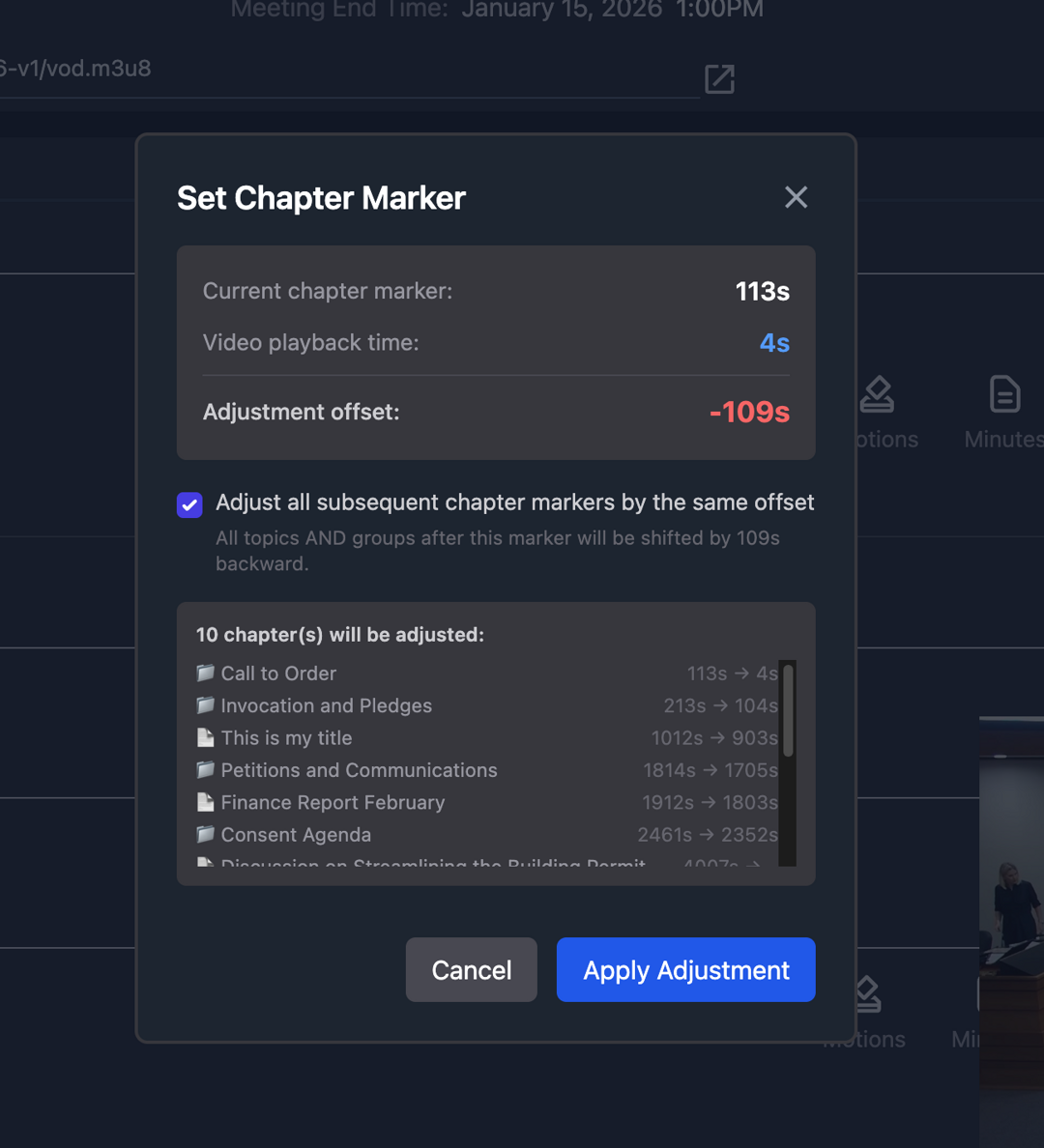
An example use case would be the video and your call to order don't align. Now you can set the Call to Order chapter marker to align the chapter with where it actually happens in the video and update all the chapter markers afterward. This is a common occurrence because the recording typically never perfeclty aligns with where you start the meeting within JustMeetings which causes the chapter markers to be off.
Approvals
There is now a much easier for staff who manage agendas to review all item approvals, see who things are currently assigned to, and see the audit trail of the approvals.
Misc
- Misc UI Improvements
- Data Optimizations
Bug Fixes
- If you removed a topic from consent during a live meeting the report wasn't checking for the latest dynamic data variables to make sure all variables in the report were current.
- During a live meeting when a board member previews any topic's report it's now updating the dynamic variables correctly
- Resolved some permission issues during a live meeting if a user was a manager of a board and not listed in the members list.
- There was a potential issue where if you had a task's details open it would still allow dragging tasks between columns which in turn would cause issues with how the data is saved. This is now prevented. (7.29.2)
- On rare occassion if multiple users were in a task and chatting back and forth it could potentially lead to not storing that information in the database when closed out of (7.29.3)
- The virtual board member link wasn't allowing to click to open in a new tab or right click to copy the URL (7.29.4)
Enhancements Release 7.28
March 8, 2026
Board Portal
- The meetings section now features the new public portal design as well as the enhanced search ability.
- When reviewing topic information it now uses the Table of Contents View
- UI enhancements for those using 11" or smaller iPads
User Notes
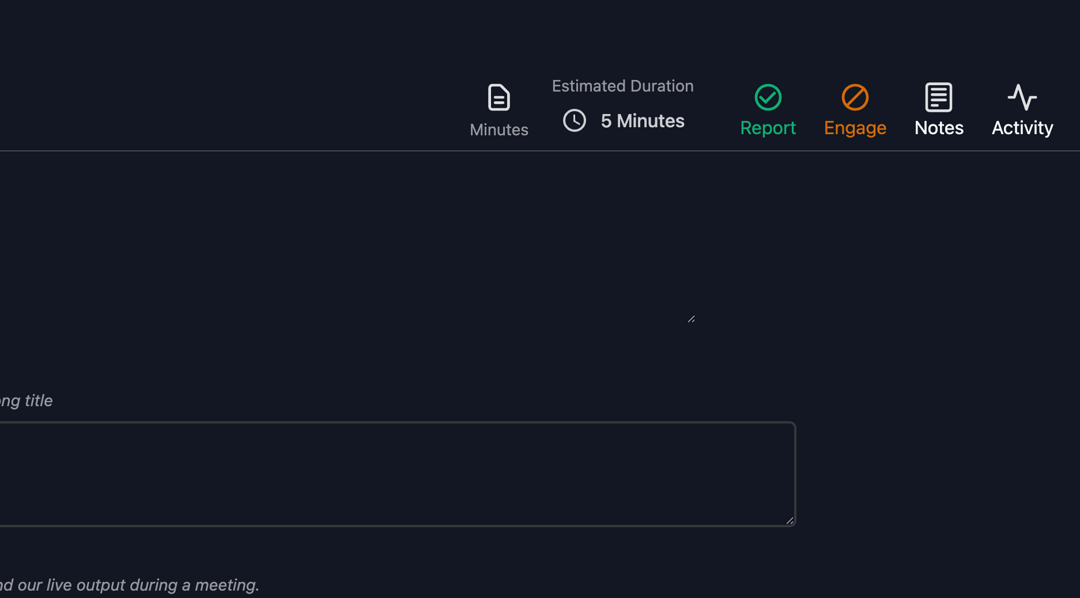
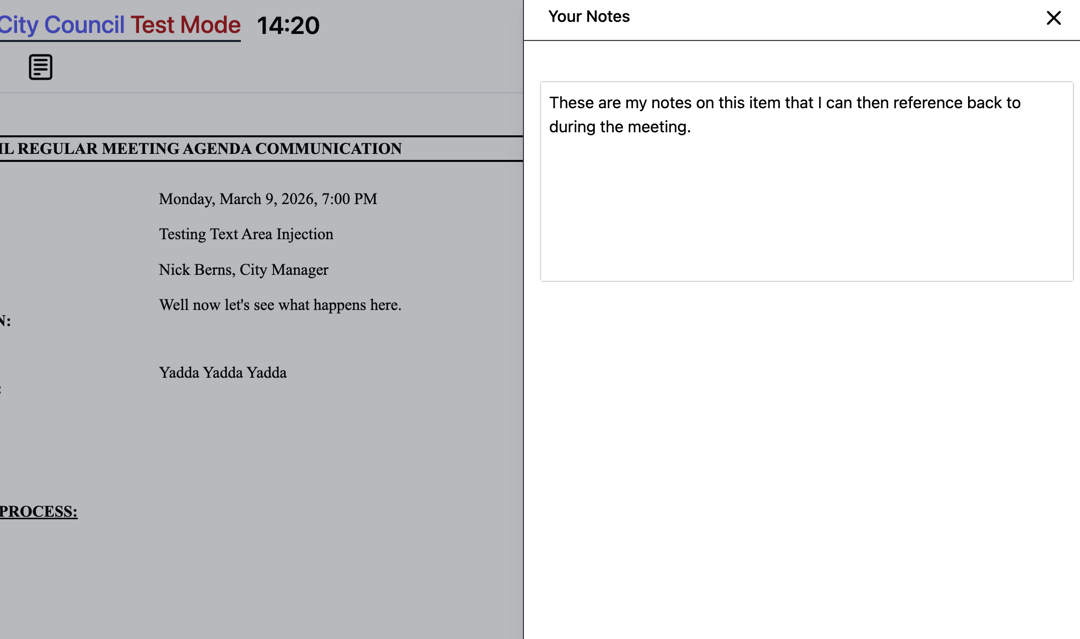
Any user can now take notes for their own usage on a topic via the new "Notes" button next to the activity button. These notes aren't available to any other user.
If the user joins live meetings (or runs them) they will have access to the notes during the meeting as well.
Misc
- Added support for Calibri in agenda body
- Added 2 new paragraph formatting options to all rich editors. One that will remove spacing from selected text and another that will remove extra spacing from the entire document
- Added access to the captions if entering minutes to an agenda group
- If using the text area custom field you can now expand it vertically and it will resize the custom field in the view.
- Public Toggle is now available no matter the user's role for anything linked from Sharepoint.
Bug Fixes
- If using a text or text area custom field in your report headers and you simply just typed a space as the value it would remove the data link behind the scenes in the report.
- If using virtual join and the email entered wasn't in the exact case as the value in the database it wouldn't allow authorization. (It's now case insensitive)
- If using topic title indent it wasn't indenting all sections underneath title correctly on the printed version.
Enhancements Release 7.27
March 1, 2026
Home
The home page has been redesigned with a new universal inbox.
- Ability to filter inbox by type (Approval, Task, or Mention)
- Now includes Meeting information if the topic is on a meeting
- Search works for topic, meeting name, and dates
Live Meetings
This release contains a number of major enhancments for running live meetings in addition to the functionality added you will also notice some UI design enhancements as well.
- There is now the ability from the meeting building view to check a box for any consent items that you know are going to be pulled ahead of time.
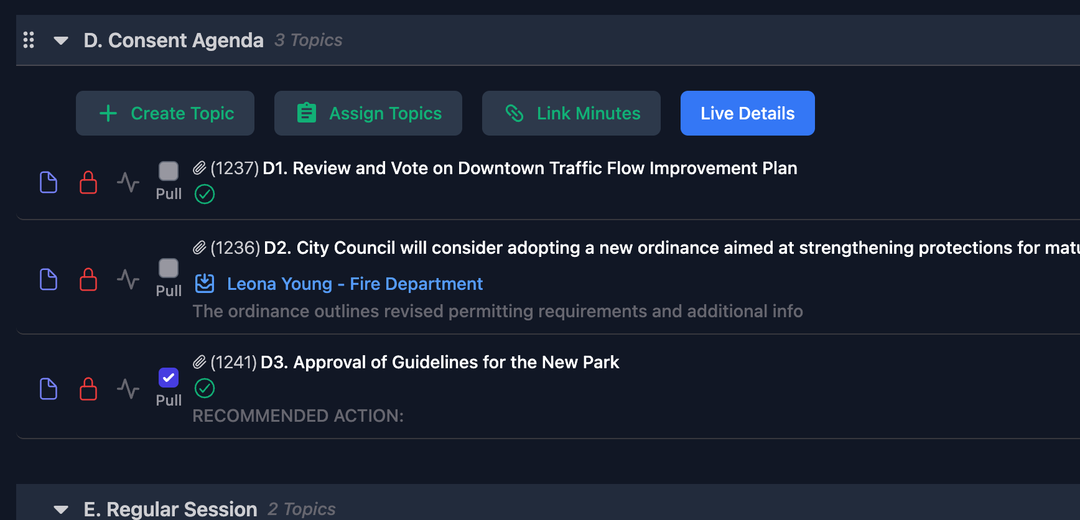
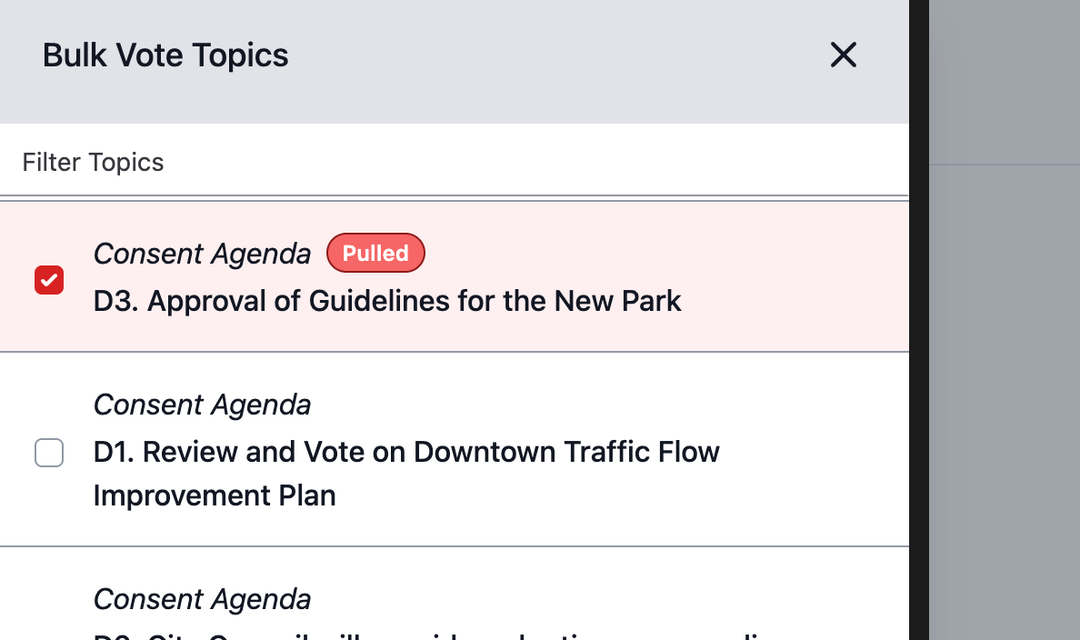
During the meeting anything pulled prior to starting the meeting are now automatically at the top of the bulk group list and signify they were pulled.
In addition each item within the list has a checkbox allowing you check items you know are going to be removed during the meeting. When checking the box it then moves that topic up with the others resulting in a much easier workflow to take action on independantly.
-
If you log a member out of the meeting; voting results now automatically shows them as absent and records an absent vote in your minutes. There's no longer the need to keep them in the meeting and click their picture to record them as absent during votes.
-
Introducing Multi Topic Voting You can now enable a multi-select mode using the "Multi-Vote" button at the top left. Once enabled, you can check the boxes next to any regular agenda item and vote on all of them at the same time. There's a new modal that appears to manage the motions and start the vote. When voting the board members can see all the items they will be voting on as well as the motion type. The voting results also showcase the numbers and titles of all the items that were voted on.
Misc
- UI Enhancements
- When sending an approval backwards the activity feed now logs that it was rejected
- Choosing yourself in the approval process list is now disabled
- When converting an agenda to pdf (or printing) if the first topic of a group won't fit on the current page it will now automatically move that group to the next page to prevent separation of a group heading on one page but the first topic being on the next page.
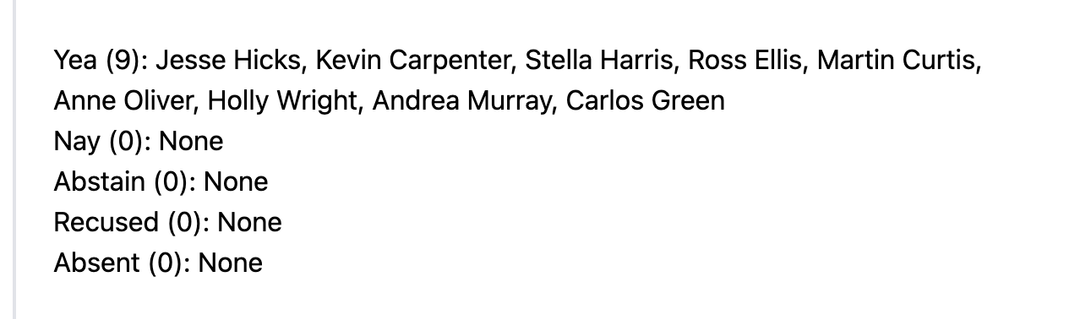
- Added a new motion wording injection option for minutes called "Full Tally". This will inject how each member voted into your minutes with each type on it's own line.
Bug Fixes
- When trying to jump and update chapters for a video coming from YouTube in the minutes editor it could potentially cause issues.
- If you had the report option turned off on a topic and it had attachments the public portal was still showing the print icon which would attempt to print a staff report that didn't exist.
- If you had illegal filename characters in the name of a board it would cause packet generation to fail.
- If using children groups under a Consent group the dropdown to view all items within consent during a live meeting would be empty. (7.27.2) - Resolved a responsive design issue on the home page where the quick action menu could result in not showing all options on lower resolution devices or higher scale windows settings.
Enhancements Release 7.26
Feburary 15, 2026
Sharepoint
- We've enhanced browsing folders with a new breadcrumb menu that matches the look and functionality from Sharepoint
- Guest Access is now supported. If you have a user who isn't a tenant on your 365 but you have made them a guest to your sharepoint site that user can now authenticate directly with your tenant and browse the sharepoint site to link files. ** We don't currently have a way for you to specify which users require guest access browsing. Please reach out to our help desk and we can assist with making it work for the users who need it **
Agenda Design / Building
- Added the ability to have topic titles indented and left aligned
- Made a minor adjustment in spacing between agenda topics making it easier to read
- There is now activity feed logging for meetings. This feature logs changing aspects of meetings similar to how it works for topics. You will find the new activity button directly to the left of the "Shrink All" button. Please note this starts logging as of this release. Any adjustments prior to the release will not have a log entry. Currently it's only available for up until Minutes Pending status. We will be adding activity logging for minutes soon.
Minutes
- Added major enhancements to utilizing the transcript when entering your minutes for topics. Make sure and watch the video to see just how much better it is.
Bug Fixes
- Fixed standard margins being ignored on agendas and topic reports when printing
- When duplicating a topic it wasn't pulling in any approval process options where it's enforced for all users, instead it was only looking at specific originator lists. (7.26.4) - Fixed potential center alignment issues on agenda headers / footers when using iframe at certain sizes (7.26.4) - Fixed an issue that could potentially lead to a negative value on the timer when using timed speaked rounds
In Other News
With all the requests and communications to us about a phone dial in solution for allowing residents to speak during a meeting I'm happy to share the news that CDS is officially building out such capability directly within the JustMeetings platform. If you would like to be put on the waitlist to get notified on updates / pricing / availability please send an email to sales@agendalink.app
Enhancements Release 7.25
Feburary 8, 2026
Agenda Building
- Board Managers and Admin users now still have access to creating / adding topics to a meeting when you have "Set the Agenda". Previously these buttons would disappear for everyone. Now they just disappear for regular users.
Misc
- Behind the scenes optimizations
- Added the ability for nameplates and door signs to be a part of our AV cloud control network
- Added support for more usb to hdmi capture devices for Kiosk OS
Enhancements Release 7.24
Feburary 1, 2026
Minutes
- When working on your minutes admin users can now open a topic and upload / link additional documents in the attachments section.
Misc
- Behind the scenes work to improve importing functionality for those moving from another agenda provider and want to bring their data with them
- Added more advanced support capabilities to our Kiosk OS device
- Can now utilize 2-way controls/logic from our AV cloud control network to JustMeetings for more advanced av control possibilities during live meetings
- Logic upgrades to OnAir for more advanced broadcast automation functionality
Bug Fixes
- If using the default board option and creating a new topic from the topics section, if the board you had chosen as the default wasn't the first board in the list the modal wouldn't pick the correct approval process list or agenda group list.
Feature Release 7.23
January 25, 2026
Live Meeting Join Links
We've added a new ability for those who may not have permanent devices for their dais or wanted an easier way for someone to join a meeting remotely. Introducing the Board Virtual Link.
Each meeting now has their own virtual join link with a passcode that can be sent out to board members to easily join from their own devices. The URL is available under the meeting properties which is also where you generate or change the passcode.
To see full details on how to use this link for board members please watch the lesson using the link below.
Misc
- There's now the ability to specify which board is chosen by default when creating a new topic from the Topics section of the software. To specify which board, go to "Boards" -> Choose the Board -> Turn on "Default Option". You will also know which board is currently marked as the default because it will say default in the boards list on the left.
- You can now specify which Memo template is chosen by default when creating new topics. In the memo templates section of settings there is a new button allowing you to mark a template to be the default option and the list will tell you which one is the default.
- Added Support for larger nameplates with resolution of 1920x540px
Bug Fixes
- Users accessing portal via mobile were getting an error when trying to access attachments on a topic.
- If you were to refresh your browser on mobile it would lose user information and thus your assigned inbox would be empty unless you logged out and back in again.
Feature Release 7.22
January 18, 2026
Permanent URL
This release introduces the ability to utilize a new permenent URL on your website where you can specify which meeting is assigned to this URL so it dynamically updates without ever having to make updates to your website. This is great for putting on your landing page making it easy for citizens to quickly access the latest agenda. https://print.agendalink.app/((your entity))/en/agenda
But we didn't stop there. This permenent URL also supports other languages. If you wanted to make other languages quickly available as well simply add a new URL with the language you want. For example, if you wanted the agenda also available in spanish simply make the url /es/agenda and it will be in Spanish. https://print.agendalink.app/((your entity))/es/agenda
The translations are all handled behind the scenes via AI and cached after first translation so they render right away in the web. We have also added a custom dictionary so if you have a citizen who points out a translation that isn't quite correct simply send an email to support and we can add it to the custom dictionary.
Below is a list of common choices
- Spanish: es
- Chinese (Simplified): zh
- Vietnamese: vi
- Korean: ko
- Tagalog: tl
- Japanese: ja
- French: fr
- German: de
Enhancements Release 7.21
January 11, 2026
Topics
- You can use multiple lines with line breaks for a topic title and the platform will maintain that when displaying within the management side, public portal, report injection, and printing.
- Added Calibri and standard Sans-Serif to font options in the editor and also added as options to default pasting font.
Misc
- You can now modify the colors utilized for showing the date on the new version of our public portal making it easy to match city branding. These new options are under "Settings" -> "Options"
- Added logging of all changes made to a user's settings similar to the activity feed on a topic so you now will have an audit log of any changes made to a user.
- We provided you with the ability to clear linked minutes assocation for a meeting if you are trying to link their minutes to a new meeting but they had been linked previously. With the minutes open click "Edit" -> "Meeting Properties" and press the "Clear Linked Minutes" button. Once you do this the meeting will show back up as an option in the Link Minutes modal.
Bug Fixes
- On occassion if someone were to go to a direct public url of an agenda the reports for a topic may not render due to the page not knowing key platform configurations not stored in memory.
- When using public preview there could be a situation where the variables in the report wouldn't show updated values (like correct agenda number).
Enhancements Release 7.20
December 21, 2025
Misc
- Added the ability to assign a department to a topic when creating from the meeting building view if you are using the "Assigned Department" option in your settings.
- Added the ability to print out the full speakers list from the minutes building view
Features Release 7.19
December 14, 2025
PDF Accessibility
This release contains early access to our new partnership with DocAccess. The partnership brings the ability to provide accessible and translatable pdfs as part of your published agendas. If you would like early access to this feature please reach out to support and we can assist with getting you an account setup and feature turned on.
** Video Coming Soon ***
Search
We've added a new search bar at the top allowing you to search for topics easily within the app from any section. This works similar to the new public portal search abilities.
We are very interested in your feedback to expand on what you would like to be able to do with the results. Our current plans on expansion are:
- Overview in the Table of Contents
- One Click Duplicate from Results list
This is a simple version of our upcoming global search tool. Planned for Q1/Q2 time frame next year will be our smart assistant "Clerq". Clerq is our own privately hosted AI engine we are teaching to understand the data within JustMeetings in order to be able to assist our user base to find the information they are looking for in a conversation manner.
Misc
- Added Table of Contents view for topics on v1 public portal to match functionality that exists on the v2
- Added Table of Contents view to Video Player when looking at topic information
- Added Table of Contents view to Public Preview making it easier to review the entire agenda with reports and attachments on each topic.
Bug Fixes
- If a meeting manager who isn't choosing topics during a live meeting would attempt to take notes there was the possibility it wouldn't know what they were trying to take notes on and wouldn't store them.
- Topics with no report but had attachments wouldn't show as a clickable link on the public portal for a specific device resolution size
Enhancments Release 7.18
December 7, 2025
Public Portal
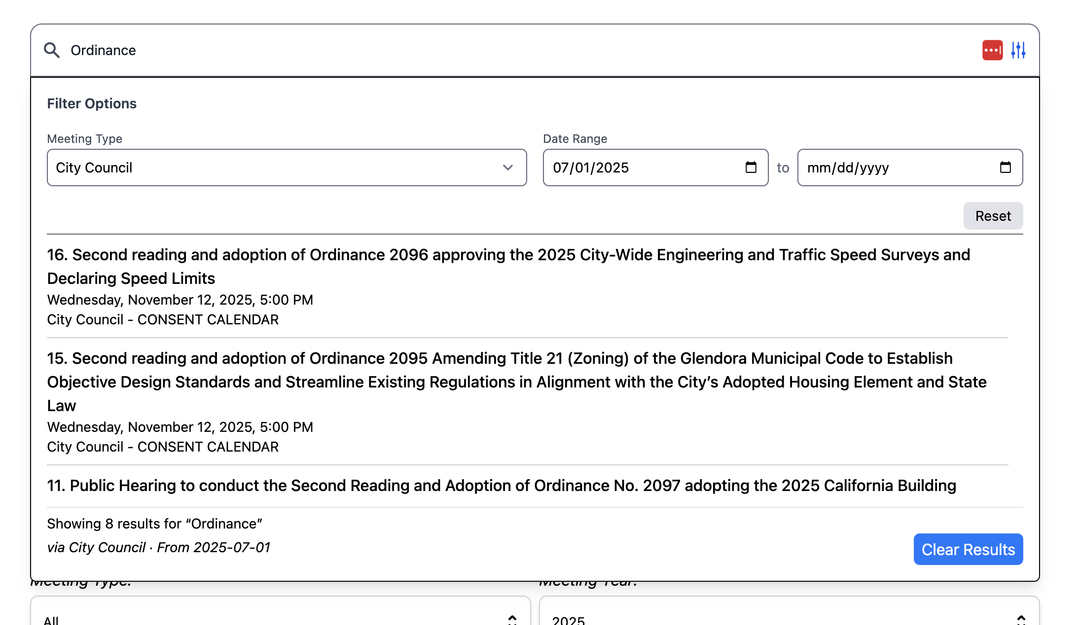
We've added filtering options to the new public portal search. These filters can be applied at any point and the results will automatically update. The search results will also tell you if there are any filters being applied underneath the count of returned items.
Misc
- You can now specify a default font and font size whenever a user pastes information into the editor. It will also no longer prompt a user to keep or remove formatting.
The values are set by default to Arial size 12. If you would like to modify that go to "Settings" => "Topics" => Editor Paste Options

- If manually changing the status of a meeting and you switch between agenda / minutes aspects it will now automatically update the functionality to the correct status that was set.
- On the meeting building view if a topic has attachments it will now show you a paper clip icon next to it's title as an easy way to see whether it has attachments or not without having to click into it.
- Added new heartbeat system to the editor in order to improve the editor from thinking a user has left it open if they close out of the browser and the server doesn't see the disconnect.
Bug Fixes
- If right clicking in a table the table property options weren't showing up.
- The api call to populate topics on the in room public speaker sign up page could potentially not show topics due to UTC time being used on the server. It now uses your timezone correctly.
Enhancments Release 7.17
November 23, 2025
Topics
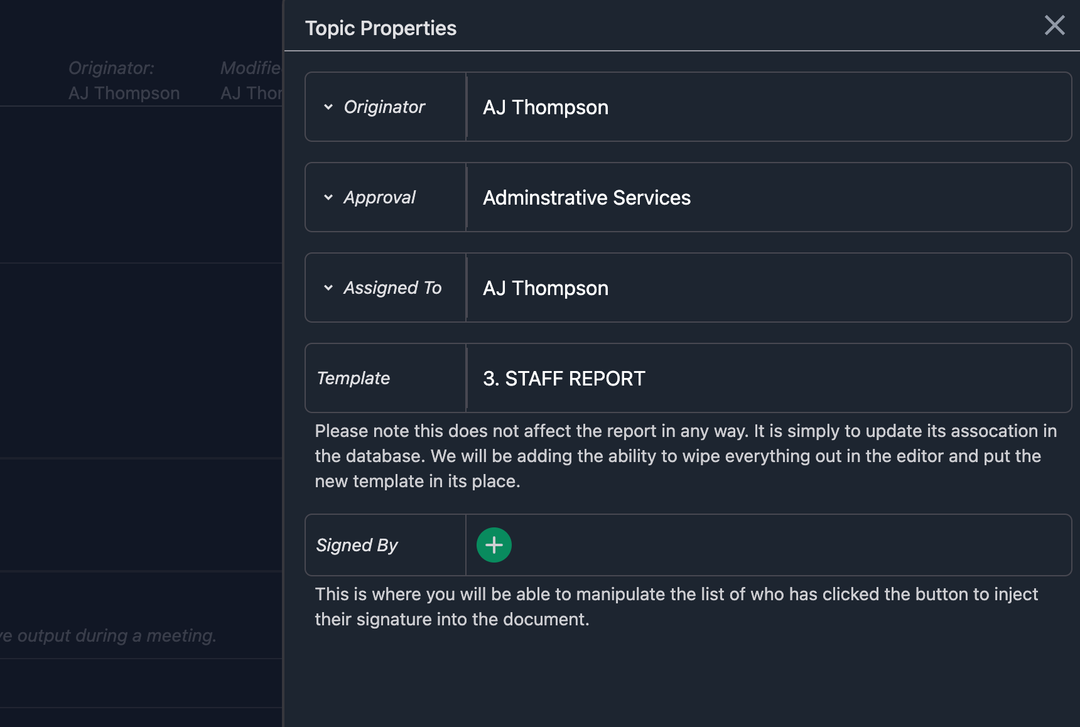
We've added more granular controls for admins in the topic properties slide out. You can now
- Change the originator
- Change the approval process associated with the topic
- Assign the topic to any user whether part of the approval process or not.
Misc
- Board members can now print out the speaker count and full list of registerd speakers for a meeting within the board member portal
- In the new public portal, if you translate an agenda and press the print icon, the translated version of the agenda is what prints.
- Added a new field under meeting properties where you can copy and paste the link for joining a meeting virtually. When the meeting is live our software will provide a "Join" button to the public.
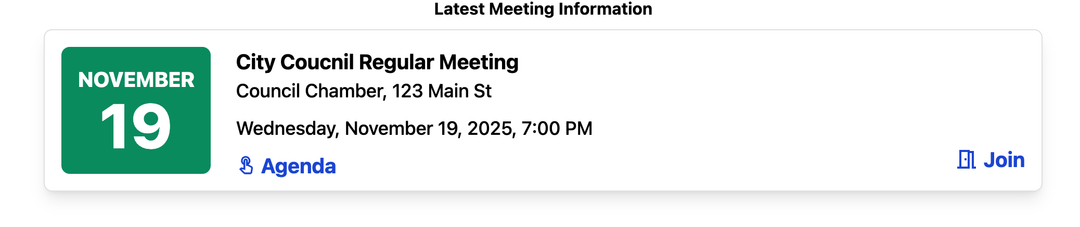 ** Please note this requires using the latest version of our public portal **
Feature Release 7.16
November 16, 2025
New Public Portal
The all new public portal is now available and was developed through the inspirations and feedback from our client base.
To utlize the new portal simply change your iframe or link to the public portal from /engage/ to /engage-v2/. If you have any questions or need assistance you can also reach out to our support team.
How to Preview on your Website
Misc
- Added the ability to click a user in Department management in settings to open their user profile and make modifications.
- Added Copy/Paste to the right click context menu in our editor.
- There is a new setting under Options that allows you to enable/disable the "Create Topic" button for all users in the meeting building view. (the feature has been enabled by default, unless you are a known client who didn't want it)
- Added Created By and Published By name and date information to the meeting properties slide out
- There is now a translation button on the public portal instead of having to go into the accessibility options and turning it on there, thus making it faster for users.
Bug Fixes
- If duplicating an item and checking include attachments, it was skipping attachments that were on the new storage cloud and only looking for attachments on the old storage provider.
Enhancements Release 7.15
November 9, 2025
Minutes
This release contains huge improvements for buiding your meeting minutes.
-
You now have access to registered speakers information while working on minutes for a specific topic. You can even highlight the information and copy it right into your minutes.

-
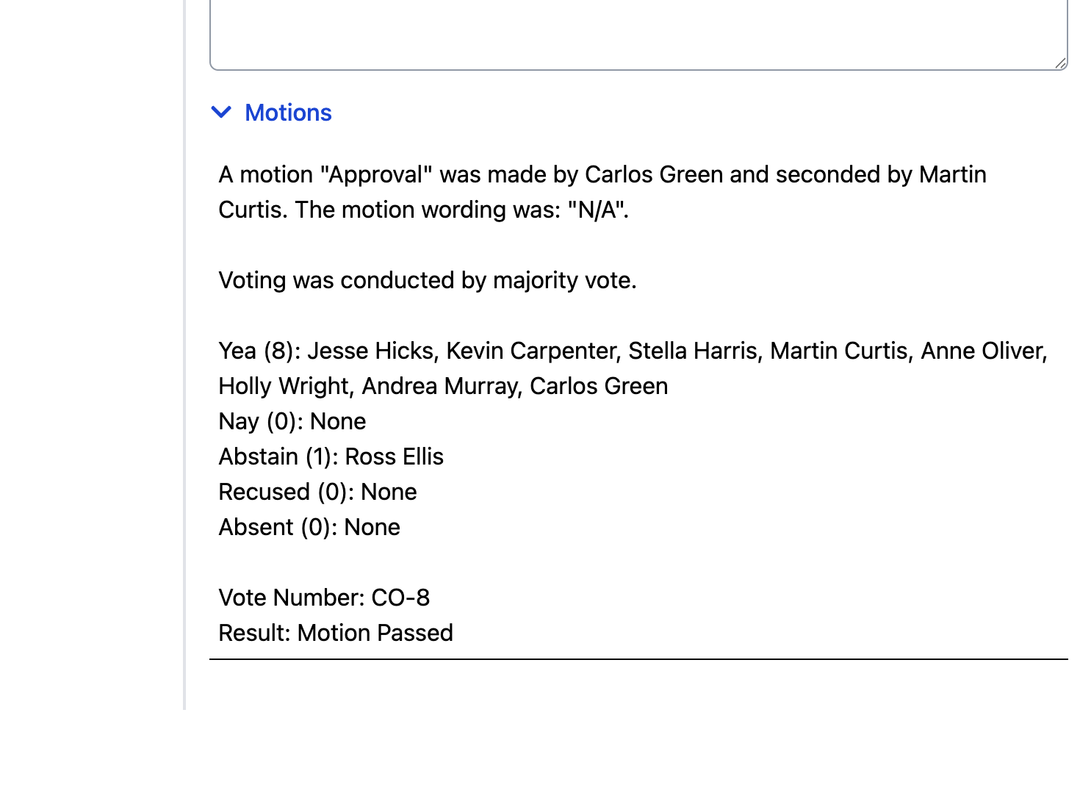
For every motion and vote on a topic there is now a synopsis of the recorded information allowing you to copy and paste into your minutes.
-
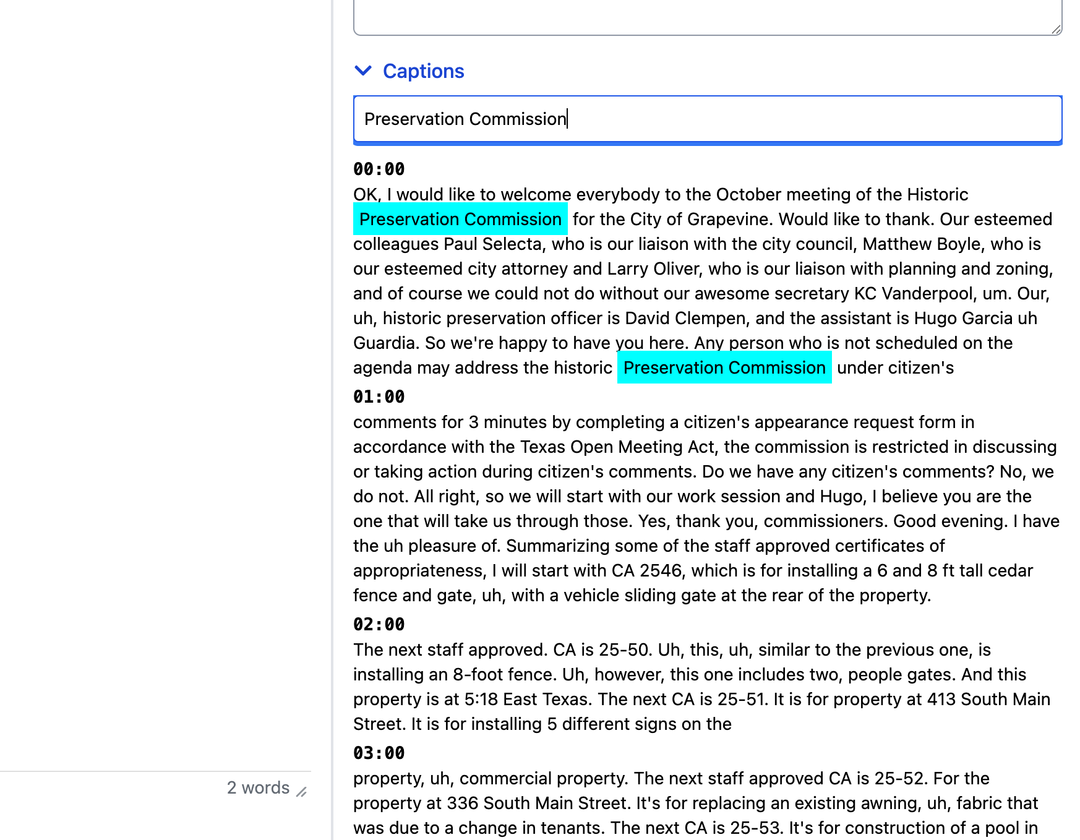
If using one of our supported closed caption services you now have access to all the captions with searchability. When you search for something it will highlight in blue throughout the captions making it easier to find the info you are looking for which you can then copy and paste right into your minutes.
Plus
-
We've added a new option under "Format" that will remove all extra spacing in the entire document which can come from copying information in.
-
Each section is collapsible on the right side of the minutes document making it easy to focus on which aspects you are working on.
Tasks
- When you use the @mention option in the comments of a task it now emails the user you mentioned with the task, what topic it's on, and what the comment was
Home Page
- When a user is assigned a task or mentioned in a report and they open it from the home page, no matter what it now gives them editing ability for the topic so that they can respond to the request.
Bug Fixes
- If you were using the "Board Preview" option to show an agenda to your board member's prior to publishing, any topics on that meeting would disappear from the assigned inbox on the home page.
- Any topics where the report option was off but it had attachments wouldn't be returned in search results in the public portal.
Feature Release 7.14
November 2, 2025
User Access Controls
This is one the biggest changes we've added to the platform with regards to granular user control. You now have the ability to control who can manage meetings for specific boards.
When provided the ability it allows that user to perform the following for any board they are a manager of:
- Create Meetings
- Edit aspects of the meeting
- Re-order topics, agenda groups, etc.
- Manage registered speakers
- Publish
- Run the meeting live
- Type up meeting minutes
- And even modify the template if desired
Misc
- Accessibility enhancements to public portal
- Squashed a few bugs
Enhancements Release 7.13
October 26, 2025
Meetings
- If you remove an agenda group from a meeting a new button will appear labeled "Add Group" which will show you all the removed groups allowing you to click on one and put it back on the meeting thus removing the need to reach out to support to get an agenda group put back on your meeting.
Engage
- Added accessibility enhancement allowing the use of the escape key to close topic information slide outs. This is especially helpful to anyone who uses a screen reader.
Templates
- Added support for using the name of the board in addition to the meeting type field for dynamic data insertion into reports
Enhancements Release 7.12
October 19, 2025
Speakers
- There's a new "Speaker List" option in addition to the "Speaker Count" option under the file menu of a meeting. This will show you a full list of all registered speakers/comments for a meeting and is printable.
Topics
- The report editor now supports inserting page breaks that are utilized when printing or converting the report to a pdf. You will find it under the "Insert" menu when you have the editor open.
Minutes
One of the most requested features is now available. We have upgraded the editor for entering your minutes to support the full editor functionality just like your reports. This includes the ability to insert page breaks for printing and converting to pdf.
Upgrading the editor was phase 1. In phase 2 of this enhancement we will be adding the ability to easily inject data into the editor from captured information from the meeting. This will include things like:
- Motions / Votes
- Public Speakers
- Transcriptions
** Please note this upgrade only applies to minutes you type up after this release. Any minutes typed on a topic or group prior to this release will still follow the old editor. If you have a meeting with some but not all topics with typed up minutes and you would like to have all of it match please reach out to support for assistance.
Misc
- (7.12.2) Modified how data insertion works on agenda reports so that it handles it all on the server making it much faster
- (7.12.2) Add some behind the scenes code to help with random app issues with spell checker in the editor
- (7.12.2) Upgraded Azure SSO packages
Enhancements Release 7.11
October 12, 2025
Tasks
- Optimized all data handling behind the scenes
- Added an email notification when a task you have assigned to another user has been marked as completed.
- Added an activity log to the topic whenever a user marks a task as completed
Misc
- Added back the ability to add description and sub item information to a bulk topic in meeting building for using on our live feed.
- We've been very busy behind the scenes preparing things for more enhanced searching capabilities. We can't wait to show you once it's ready.
Enhancements Release 7.10
September 21, 2025
Misc
- Added a button for refreshing meeting data on the agenda building view whenever desired (directly to the left of the Shrink/Expand All button)
- Added the ability to quickly filter through the activity log
- Changed uploading files and images to Backblaze cloud storage
- Optimized the functionality behind agenda packet generation. Including if you make a simple change to a topic on the agenda, the software now knows and will regenrate topic pdfs and topic packets for only things modified and merge everything into the packet again making the need to generate a packet multiple times work much faster.
- We made a design change to the speaker count on a topic card during a live meeting to make it more apparent what topics have registered speakers and what the count is.
- (7.10.2) When setting user's role to "Viewer" it now automatically takes them to the "Viewer" portal which is similar to the board member portal in functionality minus the "To Sign" section.
- (7.10.3) There's now an activity logged for a topic when it's either created or duplicated and states if they put it into the queue or assigned it directly to a meeting.
- (7.10.7) You can now link multiple files at once from OneDrive/Sharepoint
Bug Fixes
- If you had more than 4 locations in the software and you tried to change a location of an existing meeting you would only see the first 4 options and couldn't scroll to see the rest of them.
- If using Azure and you were generating a packet more than once it would append the converted pdf files as new attachments every time.
- (7.10.4) When duplicating a topic it wasn't copying over what template was used from the original
- (7.10.9) If a standard user was a secondary approver in an approval process it wouldn't allow them to select the next person in the process and would only them to choose the person after the originator.
Enhancements Release 7.9
September 7, 2025
Meetings
- There's a new field called "Submittal Date". You can use this to set a submit by date for the meeting. The list of meetings will now show the schedule date and then underneath that show the submit by date. To edit the submittal date for a meeting open the meeting and click "Edit" => "Submittal Date"
- Added a button when building an agenda to quickly shrink or expand all agenda groups.
- Minor Visual Design changes
- Optimizations for drag and drop
Misc
- Duplicating will no longer copy over the action agenda information if you have enabled it and added information on the topic you are duplicating.
- Minor UI Enhancements
- Updated Video API so that when using 3rd party partners such as Cablecast it won't return all meetings but instead only meetings for boards with the "Engage Video" option enabled.
- If using our numbering functionality to apply numbers to motions/votes, searching in the topics section now supports searching that data as well. In addition to this, the topics list will also show the number for that topic above it's title in the list.
Bug Fixes
- When re-ordering topics via drag and drop there could potentially be a situation where the meeting building view wouldn't show the topics in a group in the correct order even though behind the scenes they were correct.
- (7.9.5) When an agenda is locked it could potentially still allow you to re-order topics by holding the entire topic ignoring the use of a drag handle not being visible
- (7.9.6) If you are a client using our OnAir Controls button during a live meeting and you had the speaker timer controls visible after calling on a speaker, it would prevent you from clicking the button to access your additional controls.
Enhancements Release 7.8
August 24, 2025
Misc
- Added 2026 as a filtering option
- Added a new granular user level control called "Bypass Department Visibility". The purpose of this option is for those who limit topic viewing by assigned department. You can turn this option on for a user who can then view a meeting's entire agenda that is being built instead of only the ones assigned to their department.
- Added the ability to upload a signature image instead of only being able to digitally record it (and also replace it if desired)
- Added a profile option to the board member portal where they can capture their signature or upload a photo of it. It also allows them to modify it at any time.
- Updated the request signature feature to only populate users that have had the option to allow capturing or uploading their signature turned on instead of showing all users in the software.
Bug Fixes
- During a live vote, abstain was showing grey to those who could see the submitted vote colors instead of the amber color like the button for it is.
- When reviewing recorded votes on a motion in minutes building, if a member abstained, it wasn't correctly checking that box.
- If using Sharepoint integration, it was throwing an error behind the scenes if you were linking PDFs because Microsoft would try to convert the pdf to a pdf even though it already was one and thus it would not include that pdf in your published packet.
- Resolved an issue that could potentially result in a topic thinking it had a long list of read-only users waiting to have access to edit the file.
- The Upcoming Meetings section on the public portal could potentially show a meeting that was run and completed instead of it moving down to the full list of meetings only.
- For those using SSO with Azure, we have updated our Auth logic so that if a member opens the app again it will automatically log them back in if the Microsoft session hasn't expired or the user logged out.
- Our PDF Packet generation is not a fan of filenames with special characters like periods, commas, etc. so we've added new functionality that cleans all that out when uploading a file to our cloud storage to prevent packet generation errors.
- (7.8.4) Resolved video player issues on tablets
Enhancements Release 7.7
August 17, 2025
Minutes
- When you put a motion on the floor and when you end a vote are now both timestamped. When reviewing your minutes the order of the motions are automatically sorted in ascending order based on when the votes were ended. They will also show you the timestamps
- We've implemented functionality allowing you to utlize a custom numbering scheme you have setup in the software to be applied to any topic that is voted on. This number is then injected into your minutes document dynamically inline with the topic's title.
If your topic has more than one motion it will give you checkboxes to determine which number you want to association with topic. (This capability requires a support ticket in order to be configured)
Board Portal
- Board members can now see any topics that have registered speakers on them via a chat bubble icon to the left of the topic's title when viewing the agenda. When they access that topics info they will have access to the information of the registered speakers.
- Search topics now also returns results for topics that are on agendas that are set to the "Board Preview" status. Previously it would only return results for items that were published.
Live Meetings
- Moved the timer popup on the manager screen to the top left as to not be in the way of the buttons in the middle of the screen
- If you accidentally hit a member's photo during a vote as a manager, there is now the abiity to close it without submitting a vote
- The pause button is now available on all timer controls
Live Hardware
We are happy to introduce our all new JustMeetings Kiosk OS that can be utilized on pc hardware (like a micro pc for example) for dais member screens. They also support picture in picture with a usb capture device connected to them. You can even provide us with the hardware if desired and we will image them or you can just purchase them from us in micro pc format. They arrive ready to go out of the box (no registration codes).
This makes a great alternative to using BrightSign Players providing much more power and performance. And if you're using Windows computers it removes the need to manage a bunch of extra devices. All devices are managed by our team via our secure cloud network which includes the ability to take screenshots for remote support needs. If you would like to learn more about this please reach out to support.
Misc
- Data Optimizations (especially with Minutes)
- UI Improvements
Enhancements Release 7.6
August 3, 2025
Speakers
- Added support for updating the number of registered speakers on the topic cards during a live meeting. The numbers will now automatically update whenever someone signs up using our live sign up functionality in the room.
- Added the ability to use an agenda group as an option for the public to register speak on. This is only possible if you do not allow topics to be assigned to the group and you have the Live Topic / Sign Up checkboxes checked in the Board settings for that group.
When you have the Sign Ups option checked, our live in room sign up feature will display that agenda group as an option to register on. You can access the registrations like any other topic within the portal and will see the registrations when running a live meeting.
- Moved the timer popup on the live meeting UI for admin users to the top left as to not cover up the ability to review the current topic.
- Added the ability for both admin and managers to stop and clear the timer if started by either user.
Misc
- Made some minor UI enhancements to better differentiate the agenda groups and topics in the new meeting building view
- When working on your minutes the "Motions" button will now be green if there are recorded motions on that topic making it easier to know which topics have motions / votes vs which ones don't. Previously the only way you would know is if you clicked the button to expand it.
- Updating more components of public portal to achieve AA/AAA WCAG Levels
- Public Portal UI improvements on mobile
- Data Optimizations
Enhancements Release 7.5
July 27, 2025
Meetings
- Added two new variables you can use to inject dynamic data into your meeting's cover sheet. Meeting Type and Date with no day of the week. You can set these up in your template and also on individual meetings. To change the "meeting type" you can achieve that within the meeting properties of a meeting.
- Added Description and Sub Items information to the meeting building view underneath each topic's title
- Updated functionality for modifying agenda group names and subheadings to support either pressing enter, tab, or clicking away from the text box.
Speaker Registrations
Added a new "Subject" field available for use in your forms provided to the public
Misc
- Data optimizations
Enhancements Release 7.4
July 20, 2025
Agenda Building
We've revanmped the agenda building screen to provider easier functionality for:
- (Dragging and Dropping) There is now a drag handle to the left of all groups and topics if you have the correct priviledges
- (Dragging and Dropping ) You can now drag topics from one group to another
- (Groups) To change a groups name or subheading all you have to do is click on it and update the text. Pressing enter will then save your changes.
- (Topics) There are now 3 icons to the left of a topics title all 3 are clickable to quickly perform that function and have hover tips on them.
- Include Report: Click this to turn the option on / off if this item has a report for the agenda. (approver role and higher)
- Lock: Click to lock or unlock the item. (approver role and higher)
- Activity Feed: Click to quickly view the activity feed for this item.
- If a topic has a long title that is cut off you can simply hover your mouse cursor over it and the full title will popup in a tooltip.
- All groups are expanded by default with the ability to quickly shrink them down using the arrow to the left of it's title.
Click to Watch Lesson on Agenda Building
Live Meeting
Added support for parent / child group numbering on the topic cards and live meeting output.
Bug Fixes
- Resolved an issue where nextMeetingDate and dateOnly variables weren't populating in pdf versions of agendas and packets. (7.4.3) - If using Originator inline in an approval process it could potentially throw an error when trying to open a topic. (7.4.3) - If using the Import from URL to import topics into a meeting it would wrongfully apply agenda groups if you had been setup to support importing for multiple boards
New Lessons
Click to Watch
Feature Release 7.3
July 13, 2025
Signature Requests
With signature requests you can put a signature request into your topic reports specifying whose signature you need and where. This puts a placeholder into the report notating who needs to sign. A key thing to know is that this placeholder doesn't get sent to the public view so you don't have to worry about them seeing it.
For regular users, it will put a task on their home page notating there is a signature request for them. For board members, it puts them into the to "To Sign" section of the board portal.
When the user whose signature has been requested clicks on the signature request it will put their signature into the report along with date/time of what it was inserted. If the user doesn't have a signature stored, it will first ask them to save their signature.
Misc
- Minor UI Improvements
- Data Optimizations
Bug Fixes
- If an item only had non-public attachments it would still show the topic as clickable on the public portal even though there were no attachments availalbe for the public to view
- If using Meeting Type for data injection into your reports and the item wasn't on a meeting it was removing the data link
Release 7.2
July 6, 2025
Misc
- Misc Minor UI Improvements
- Misc Data Optimizations
Bug Fixes
- Resolved an issue that could potentially leave the approval confirm modal showing after hitting the "Confirm" button.
- Resolved an issue where if using data insertion into our editor and there was no data to insert it would remove the data link all together preventing further population.
- If using createdBy or assignedDepartment for report variable injection, it would remove the info when publishing due to those fields not being part of the final data insertion check when publishing an agenda.
- (7.2.2) The resusable list of sub items wouldn't save properly if you just added an item with no additional editing.
Feature Release 7.1
June 29, 2025
Editor AI Assistant
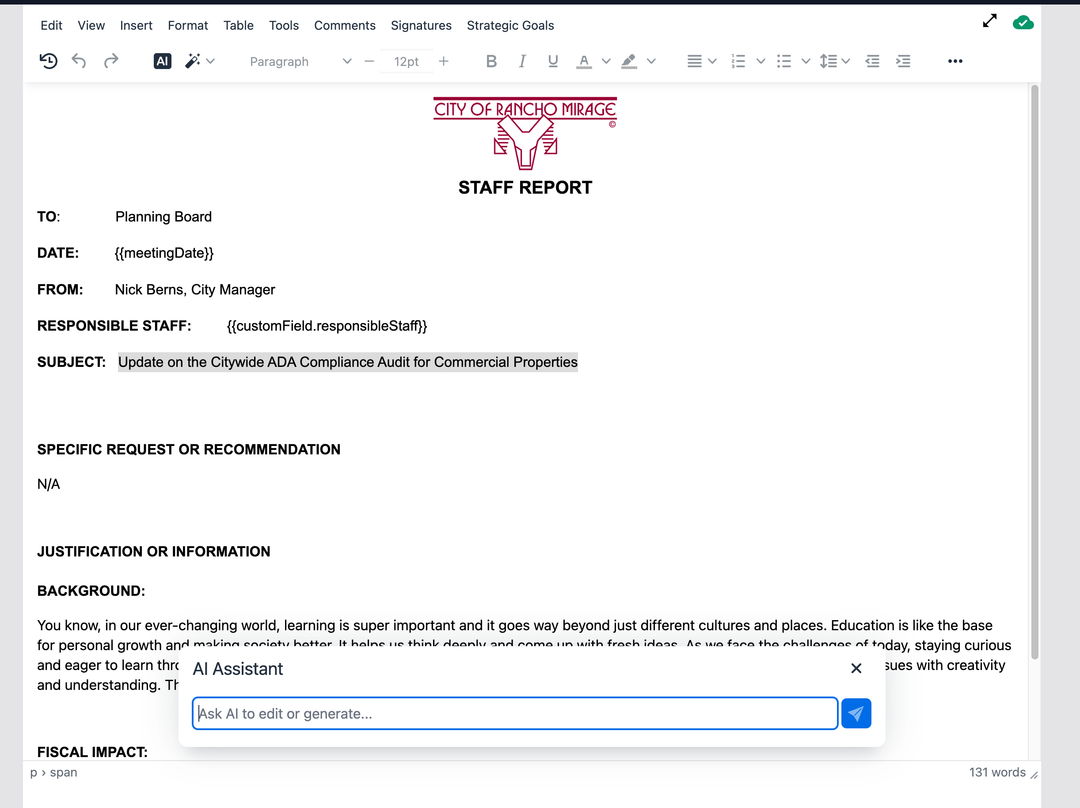
This release introduces AI abilities (powered by ChatGPT) inside of our editor. You will notice two new toolbar buttons.
The AI button can be used to ask AI questions or to write you something and it will return information you can then click to drop into your report. You can also do things like highlight a bunch of text and ask it to change the styling. For example "Change this text to Times New Roman"
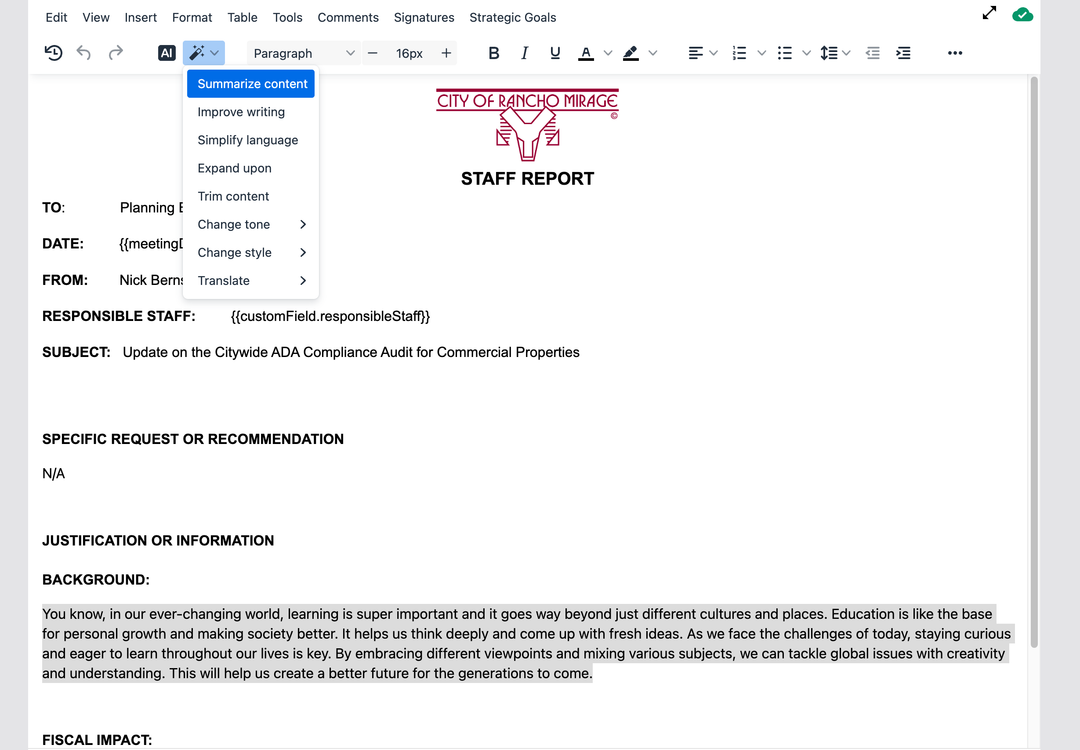
The AI Shortcusts dropdown provides options to modify highlighted text
Please note that this is the initial release of this functionality. If you or your staff have ideas on other ways to utilize AI in our editor we would love to hear from you.
Accessibility
Added Accessibility support to agenda topic reports. This means that AI will work to resolve accessibility in real-time on your individual reports as well as support translating them into any language desired.
Topics
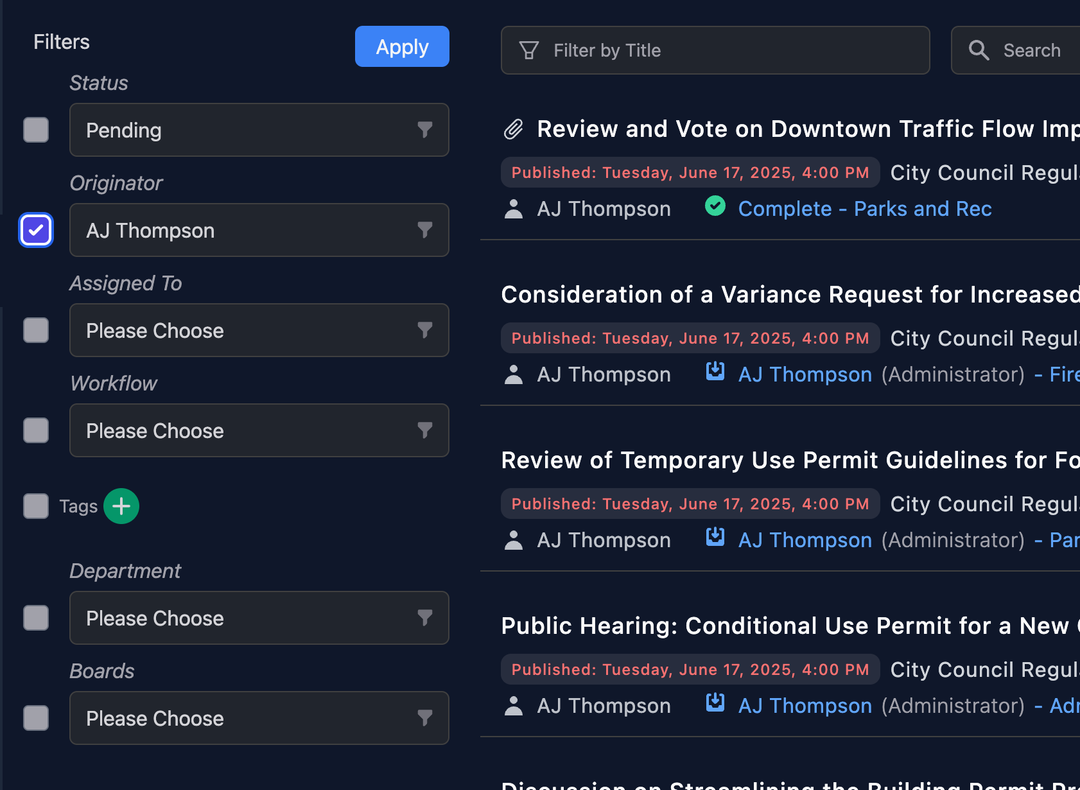
- Added a new filtering option allowing you to filter by the "Originator"
Approvals
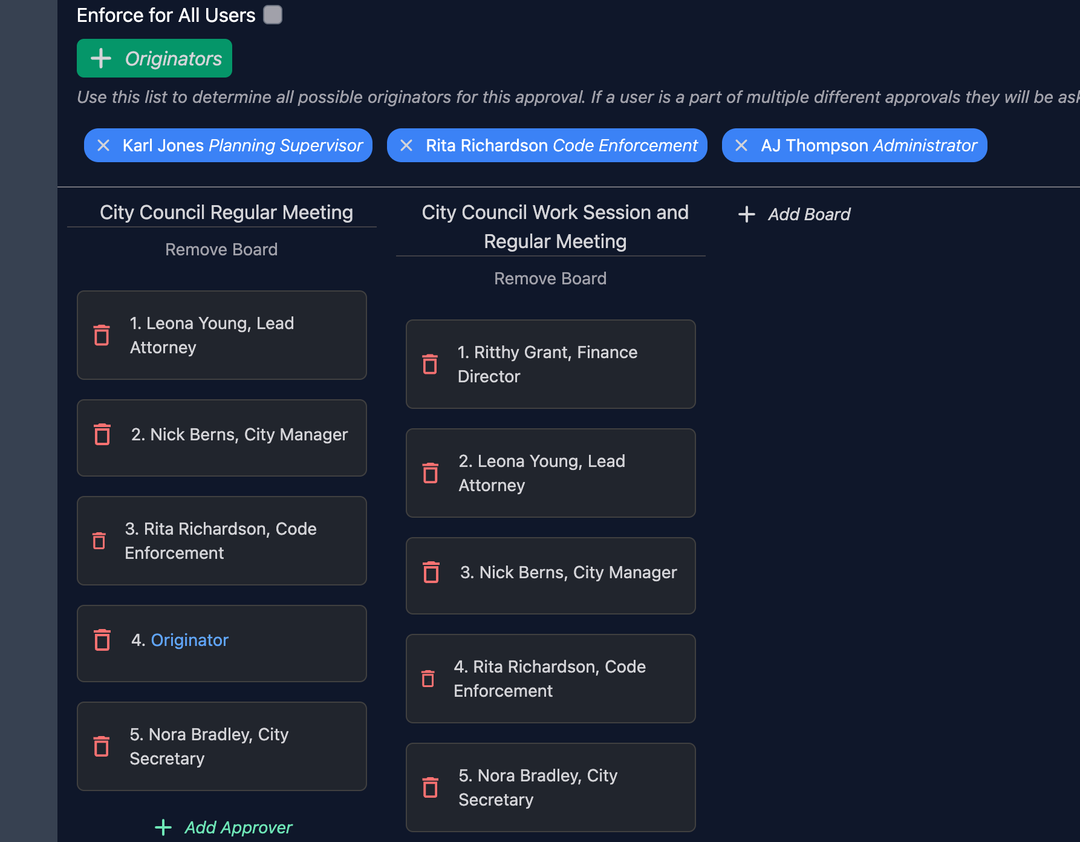
Added the ability to put the originator as step in an approval process
Misc
- If you cancel a meeting, those who have subscribed to be notified through the public portal will now receive an email with the name and date of the meeting letting them know it's been cancelled.
- There's a new option under the format menu of our editor labaled "No Paragraph Spacing". This will remove any margin space that exists before and after whatever paragraph you have your cursor at in the document.
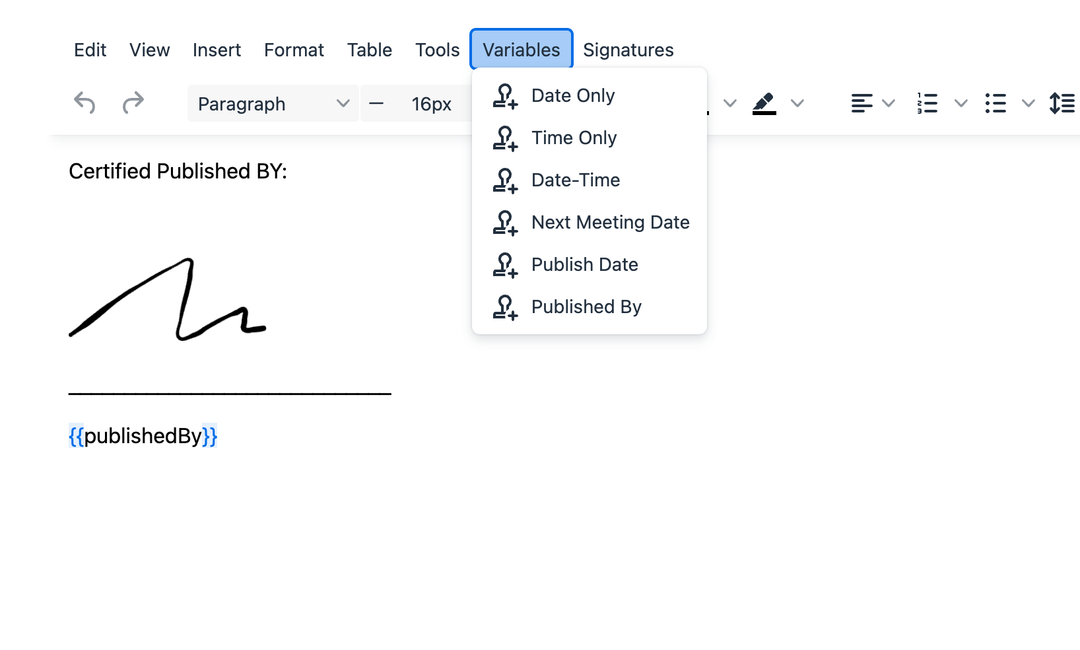
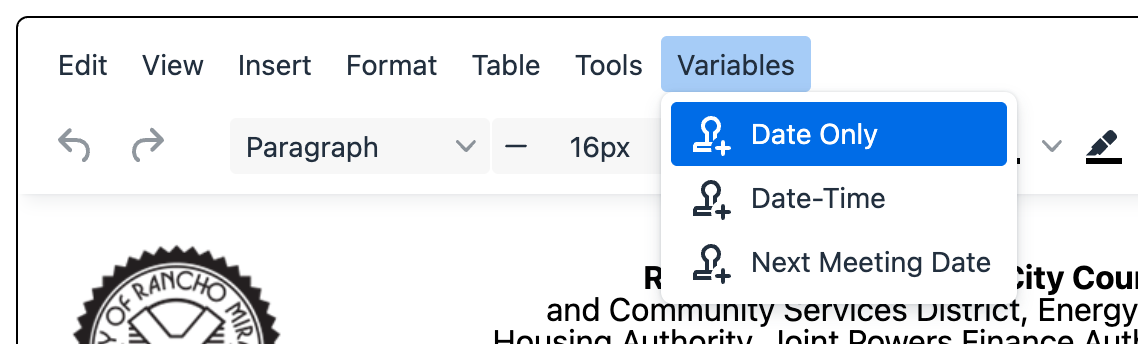
- You can now dynamically insert the name of the user who published an agenda into your template. You will see a new option in the "Variables" menu called "Published By"
Bug Fixes
- Jump to and Update Chapter buttons in the minutes building wasn't working on the video if you were using YouTube or Vimeo.
Major Release 7
June 22, 2025
Accessibility
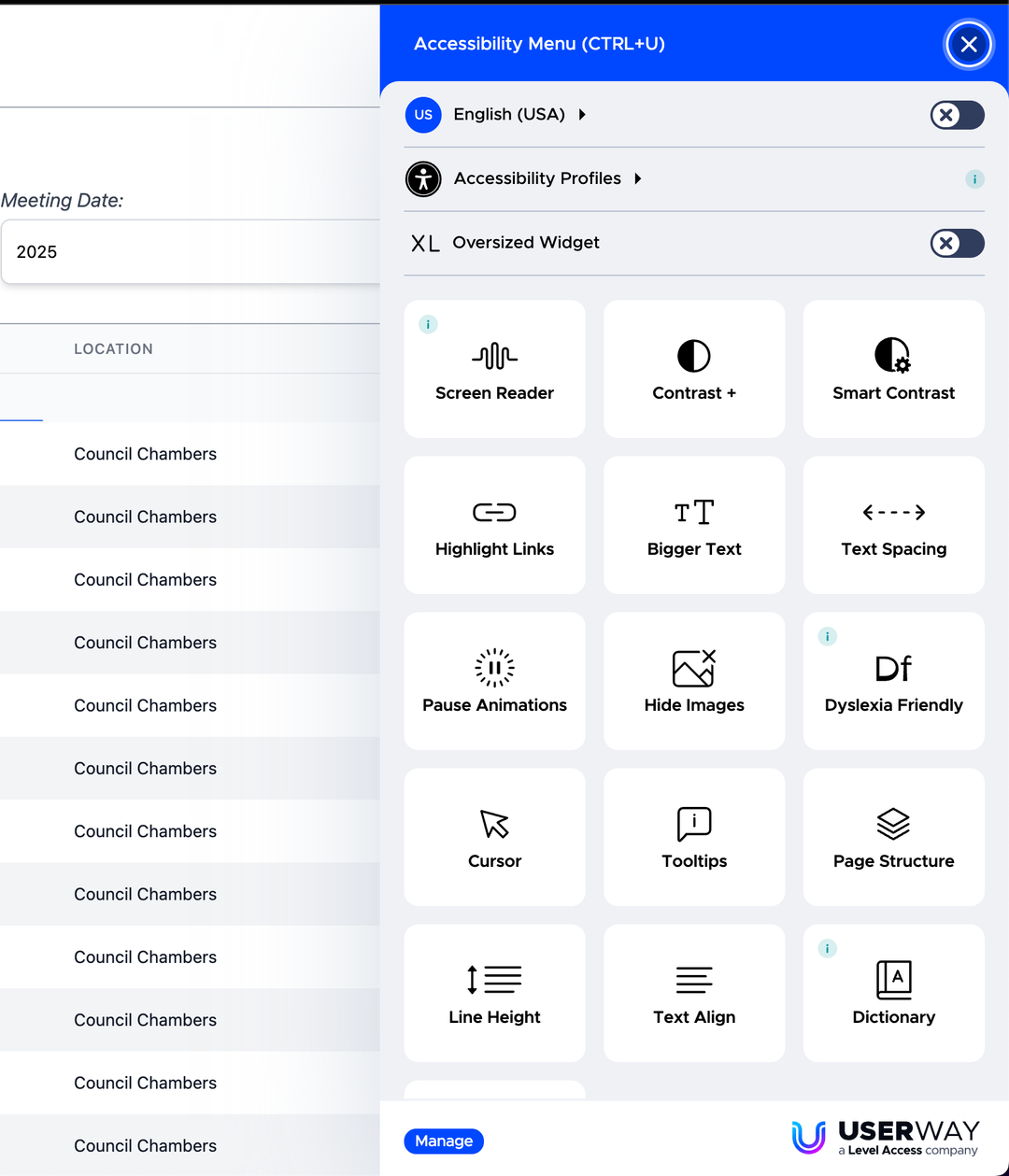
We are pleased to deliver the new accessibility widget for our public portal (powered by Userway). This widget puts the ability in your citizens hands to adjust just about everything on our public portal to make it easier to review agendas and information based on their needs.
The widget uses AI in real-time to resolve accessibility issues to the best of its abilities with your templates, reports, etc. We also receive reports on what it's fixing for you.
OneDrive / Sharepoint
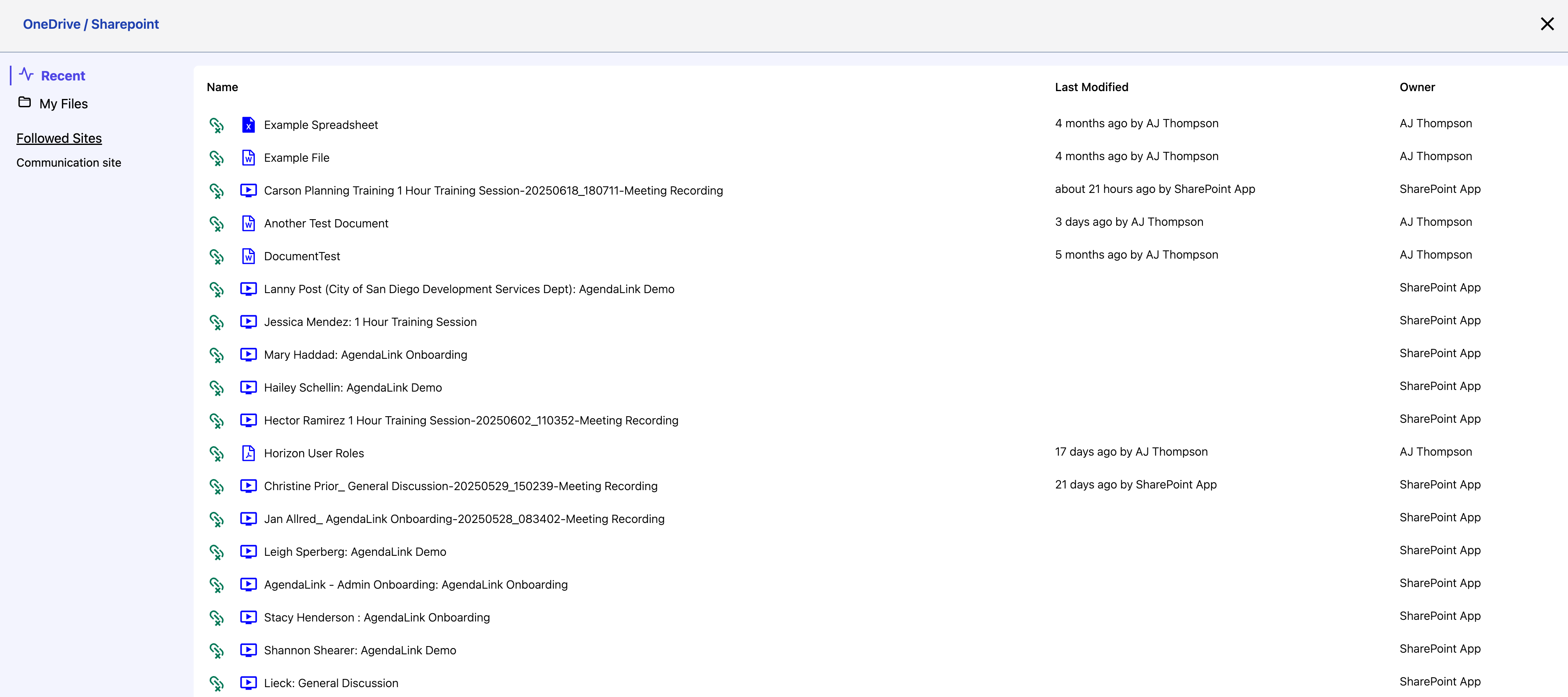
OneDrive / Sharepoint file browsing and linking is officially available. For Sharepoint, it lists all the sites within your organization that you follow.
To enable this feature, go to "Settings" => "Integrations". Once enabled, when a user logs in there will be a button in their profile allowing them to login to 365 to enable the Sharepoint button under the attachments section of agenda topics.
When Clicking the "Sharepoint" button under attachments, it will open up the file browser. In this browser you can click on individual files and it will open them in a new browser tab (which uses your office 365 credentials) to review or work on. To a link a file to the topic simply press the green link icon.
This will link the file to the topic. Here you can also click on the filename and it will open in a new browser tab to work on.
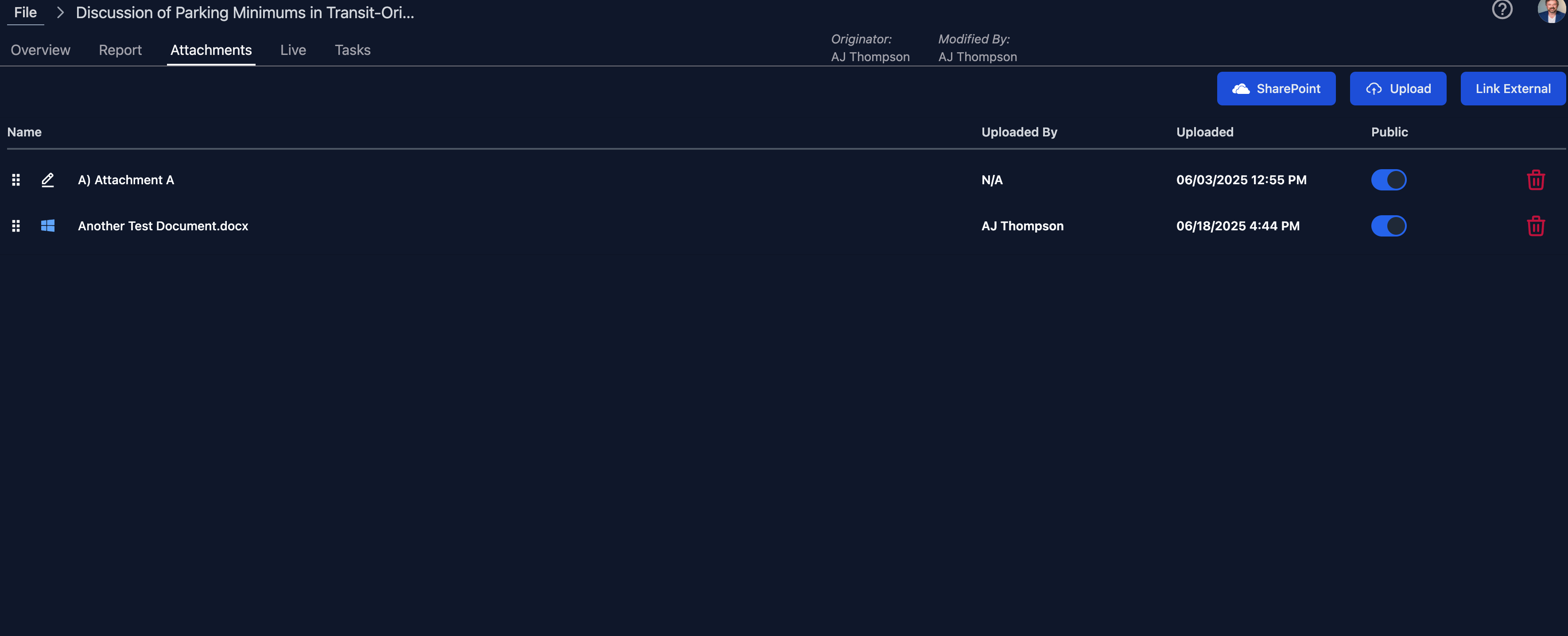
Linked files themselves are not available to the public, however when you publish an agenda and you have the linked file set as available to the public, as long as that file is word, excel, or powerpoint, it will be converted to a pdf (via Microsoft Graph) and added as a new attachment to the topic with public availablity and inclusion with the packet.
Please note that this conversion adds extra time to packet generation.
Approvals
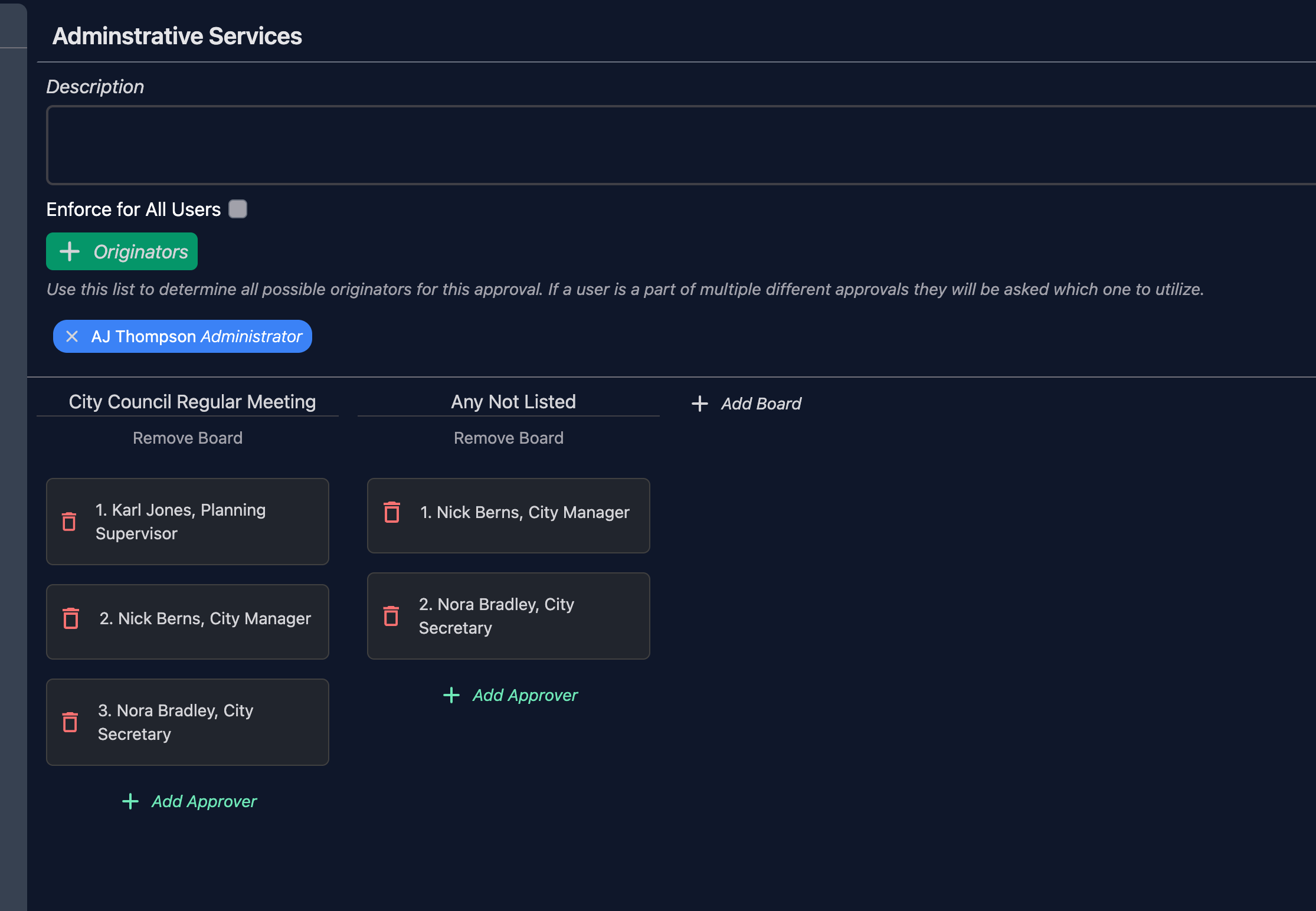
You can now specify an approval list that applies to any board not listed. So instead of having to add each and every board to an approval you can simply add this new option, specify an approval list and it will use that.
If say you have an approval flow listed for city council it's smart enough to know to use that list of approvers instead of the one designated for the boards not listed.
Misc
- When creating or duplicating an item, it now opens right away
- If you have an item that doesn't have a published report but has attachments that you want available to the public via the digital agenda it will now allow clicking that item so they can access the attachments. (Previously you had to enable the report option to achieve this)
- Misc UI Improvements
- Misc Data / API Optimizations
Bug Fixes
- If you deleted a bulk vote agenda group from a meeting, it would later prevent you from approving your minutes because it was leaving a behind the scenes topic in the database which is used to store the motions on votes on the agenda group.
- If you were using YouTube or Vimeo for your meeting videos, it was no longer allowing you to watch the video back while working on your minutes and thus also not allowing to update chapter markers.
- When duplicating an item the ability to change the originator was hidden for anyone that wasn't an admin
- If you had multiple meetings with the same board on the same day it would overwrite the PDFs making all meetings have the same pdf files
- (7.0.2) If you tried to end or recess a meeting and somehow the meeting no longer knew who started it, it would prevent the process from finishing.
Feature Release 6.25
June 15, 2025
Signatures
We've upgraded signature functionality throughout the platform. When you turn on signatures for any user it now gives them the ability to store their signature from their user profile at which point you can easily insert any captured signatures into an agenda, report, or minutes via the signature menu in the editor.
- To enable someone to record their signature you will want to enable "Signature" under their user settings. If the user has captured their signature you will see it.
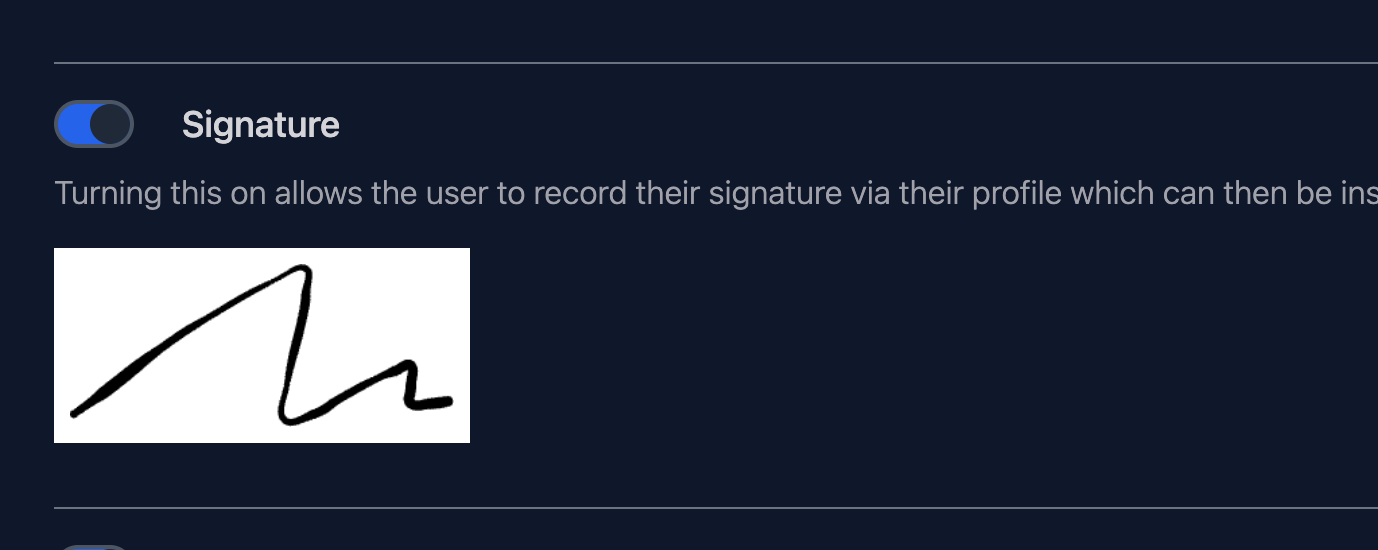
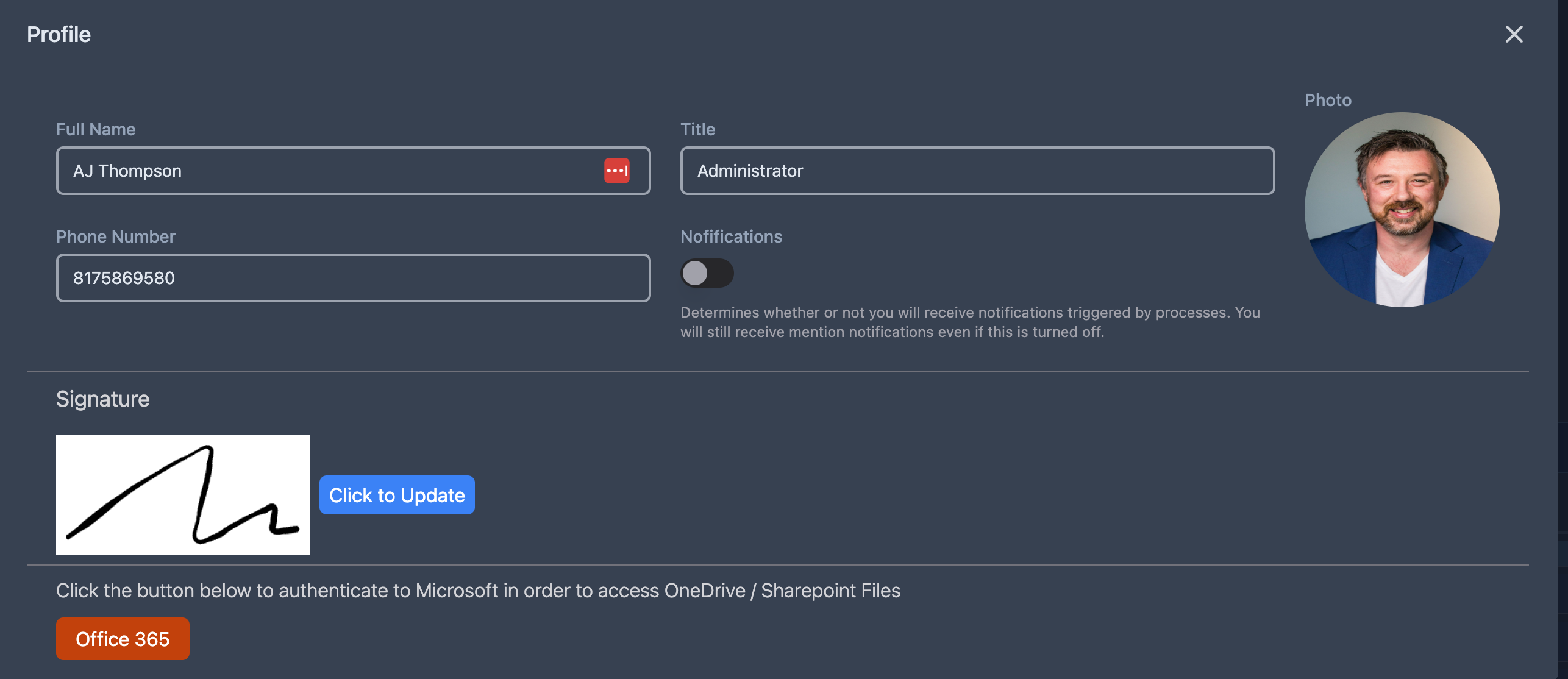
- Once this is enabled, a user can capture their signature by clicking "Your Profile" at the top right of the screen. This will open their profile and they will see a signature section where they can click a button to capture their signature. It will also show them a preview of their current signature which they can click the button to adjust if desired.
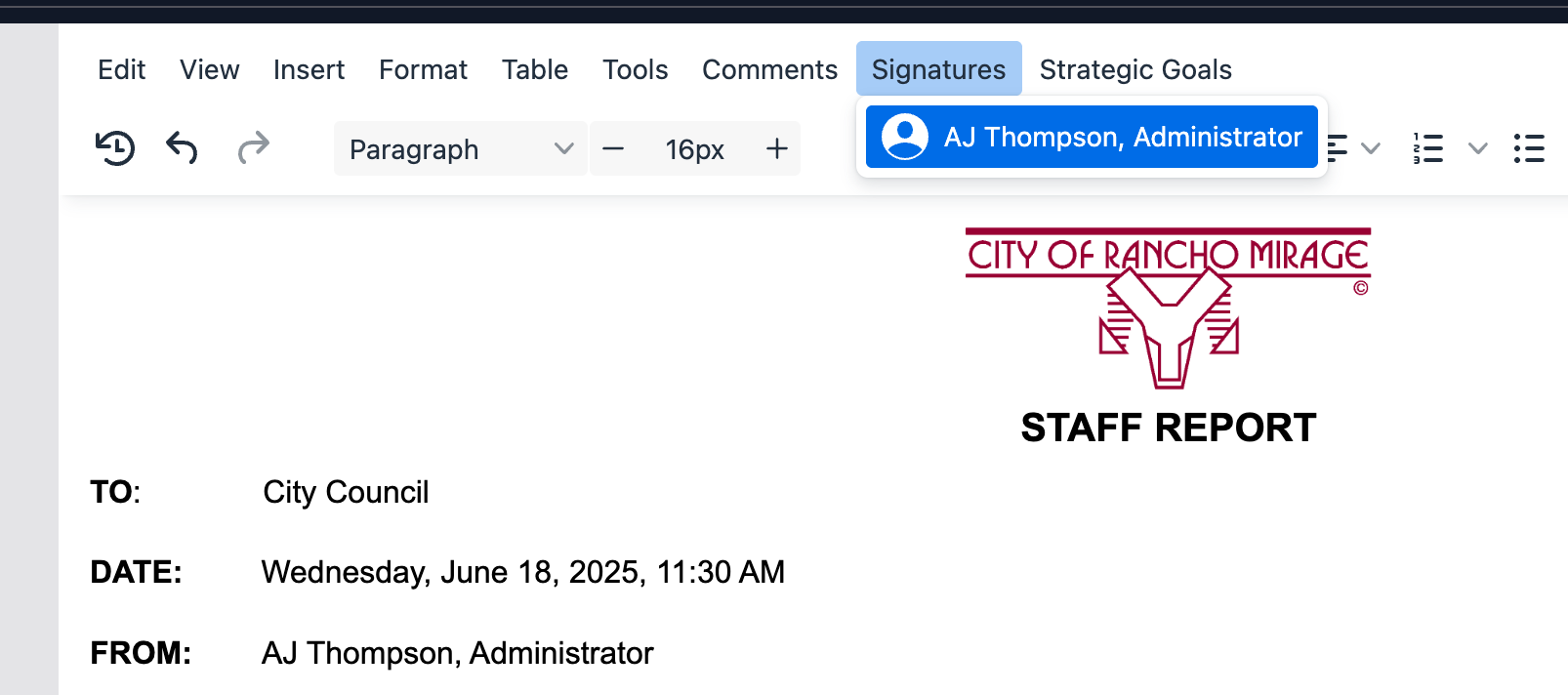
- To use the signature in your agenda, minutes, or staff report you will see a new menu appear automatically in our editor called "Signatures". This menu will show you a list of all users who have a signature captured. Simply click the name of the user and it will put their signature into the editor wherever you have the cursor.
Misc
- Minor UI adjustments
- Resolved an issue with group numbering where it was adding an extra period if you were using letters for groups and numbers within a group for items.
Enhancments Release 6.24
June 8, 2025
Topics
- You now have the ability to create and use common verbiage for your sub items.

- Press "Click to see list or create a commonly used sub item"
- This will open up the list of currently available common phrases
- Simply press the phrase you want added to the sub items list (You can type to filter the list down)
- If what you are looking for doesn't exist you can type the phrase you would like to be able to use repeatedly and press the "Enter" key to create the phrase. It will then be available for future use as well as add itself to the topics sub items list.
- You still have the ability to edit the text on the sub item added to that topic.
- We've enhanced verification methods for creating and duplicating topics to better prevent fields that may accidentally end up not filled out. Especially when related to verification with approval processes.
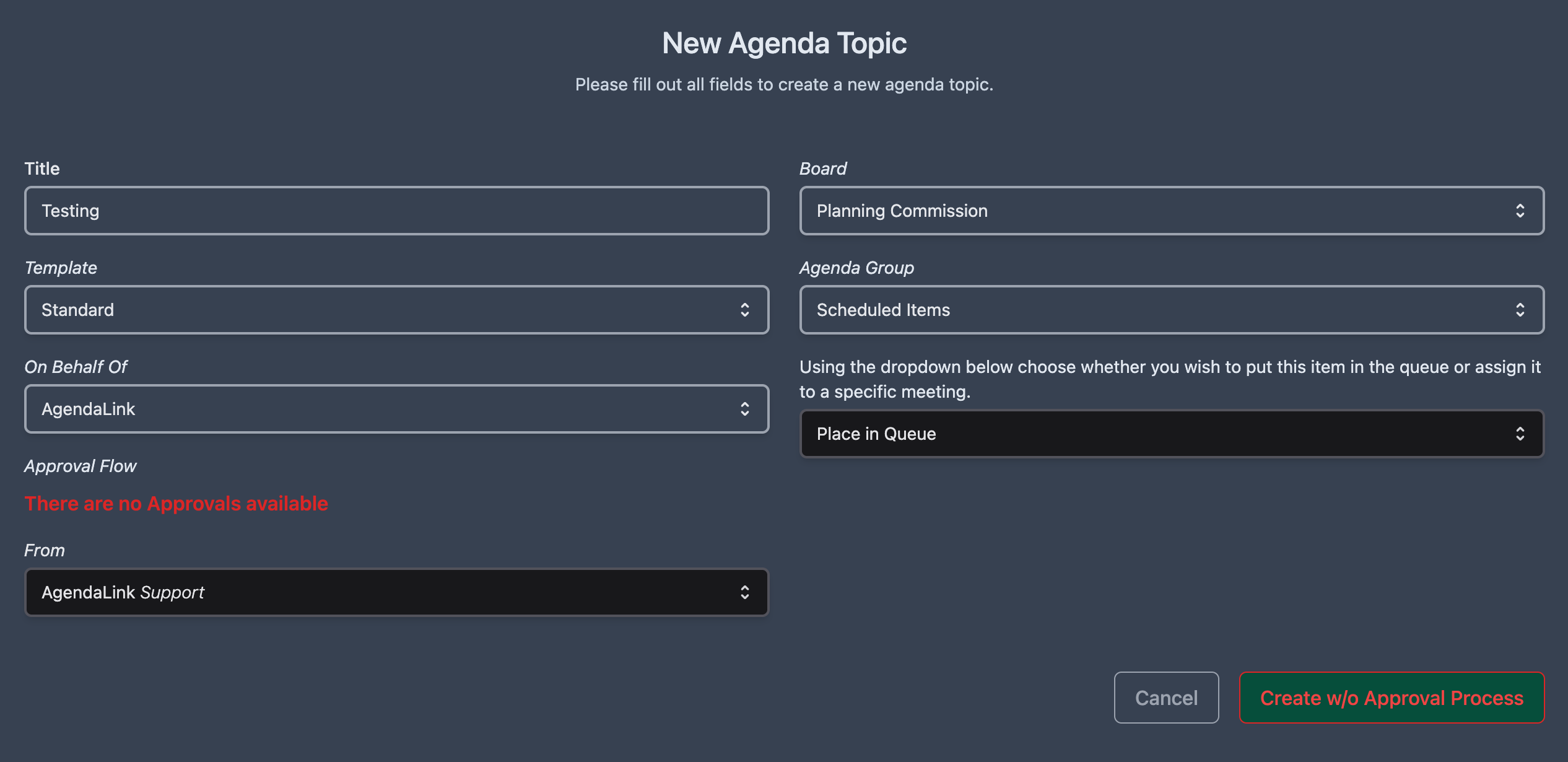
- If the user creating an item has no approvals available it will signify that in red text letting them know there are no approval available. This could be due to either the user not being an originator or approval processes they are an originator for don't have that specific board setup to have an approval process.
- When creating a topic when there's no approvals availalbe the Create button will say "Create w/o Approval Process" Please note that if you aren't currently utilizing approval processes in our software it will now say this by default. It doesn't affect anything with the actual creation of topics as you've always done things, it's just text that shows up in case you were wanting to use an approval process.
Notifications
- When an approval is marked as completed the software will now automatically notify the originator via email that the approval process for that item has been completed.
Bug Fixes
- We discovered that when adding a new topic directly to a meeting via the meeting building view and an admin would change the "On Behalf Of" field it wouldn't update the selected approval and keep the previous users selected approval.
- When opening a topic and changing the approval field on it from the meeting building view, it now updates that information correctly in the meeting building view (previously the work around was you had to close the meeting and then open it again.)
- (6.24.2) Resolved an issue where the data tag meetingType wouldn't populate correctly in the document editor
Enhancments Release 6.23
June 1, 2025
Meetings
- Added the ability to inject time only into your agenda templates
Misc
- We've started adding little help icons in the software when there is a video or tip on how to use that feature. Clicking the icon will take you to the learning site to watch and read about it.
- Resolved an issue where logging in required the email to be case sensitive
Bug Fixes
- (6.23.2) Resolved an issue where if you opened a topic and tried to change it's agenda group from the overview there was the potential the group dropdown would be empty initially
- (6.23.2) Resolved an issue where configuring agenda groups within boards and you checked a box to signify if a group could have topics assigned to it or not, it could potentially thrown an error
Enhancments Release 6.22
May 18, 2025
Agenda Groups
You can now define a numbering scheme for groups that are children to a parent group in the Agenda Template section when managing a board
Meetings
- When looking at all the items on a meeting you will now see a little red lock symbol for every topic that is locked on the agenda.
- There's a new option when editing a board template's headers/footers and when editing the cover sheet for a specific meeting that will allow you to add a data variable for the next scheduled meeting for that board. If there's no meeting currently scheduled is will put N/A otherwise it will put the date of the next meeting automatically.
Video Player
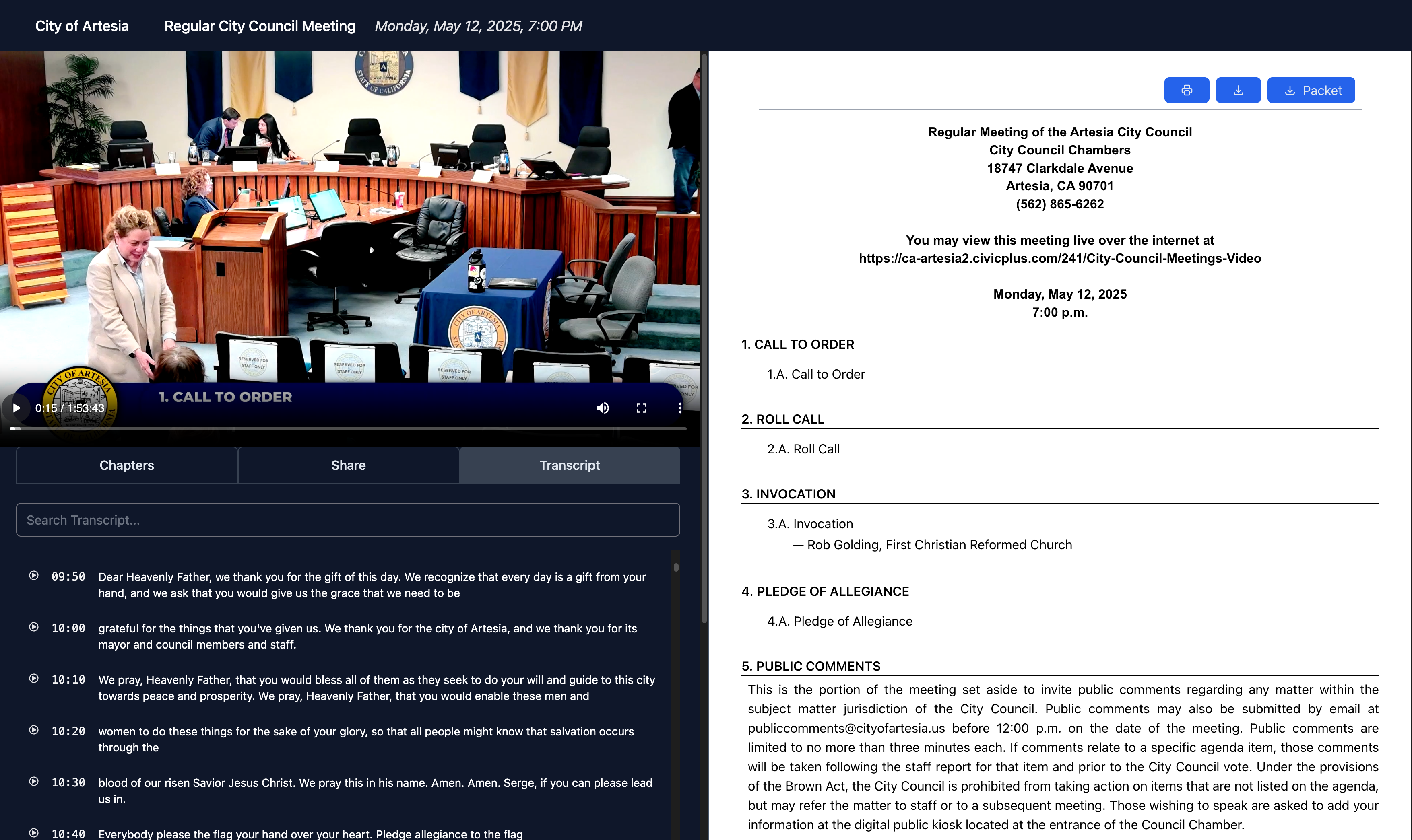
- The video player has gone through some design enhancements where you now have the full agenda on the right side with a chapter index on the left side under the video. When clicking on a chapter it will open associated topic's info on the right side of the screen if available.

For historical pdf data that includes an archived video you will see the PDF on the right side. If you are using our AI archive ability and the video has chapters we are currently reviewing how to make it possible to show that topic's info on the right side.
-
There are now share buttons so you can share a live stream or on demand video via email, facebook, and X
-
If you are using a Cablecast server with Closed Captions, our player now provides the full transcript and it's searchable making it a breeze for anyone to find something that was said and quickly jump to it in the video.
Misc
- Data Optimizations
Enhancments Release 6.21
May 11, 2025
Agenda Groups
We now support making agenda groups children of a parent agenda group. Thus creating "sections" within an agenda group.
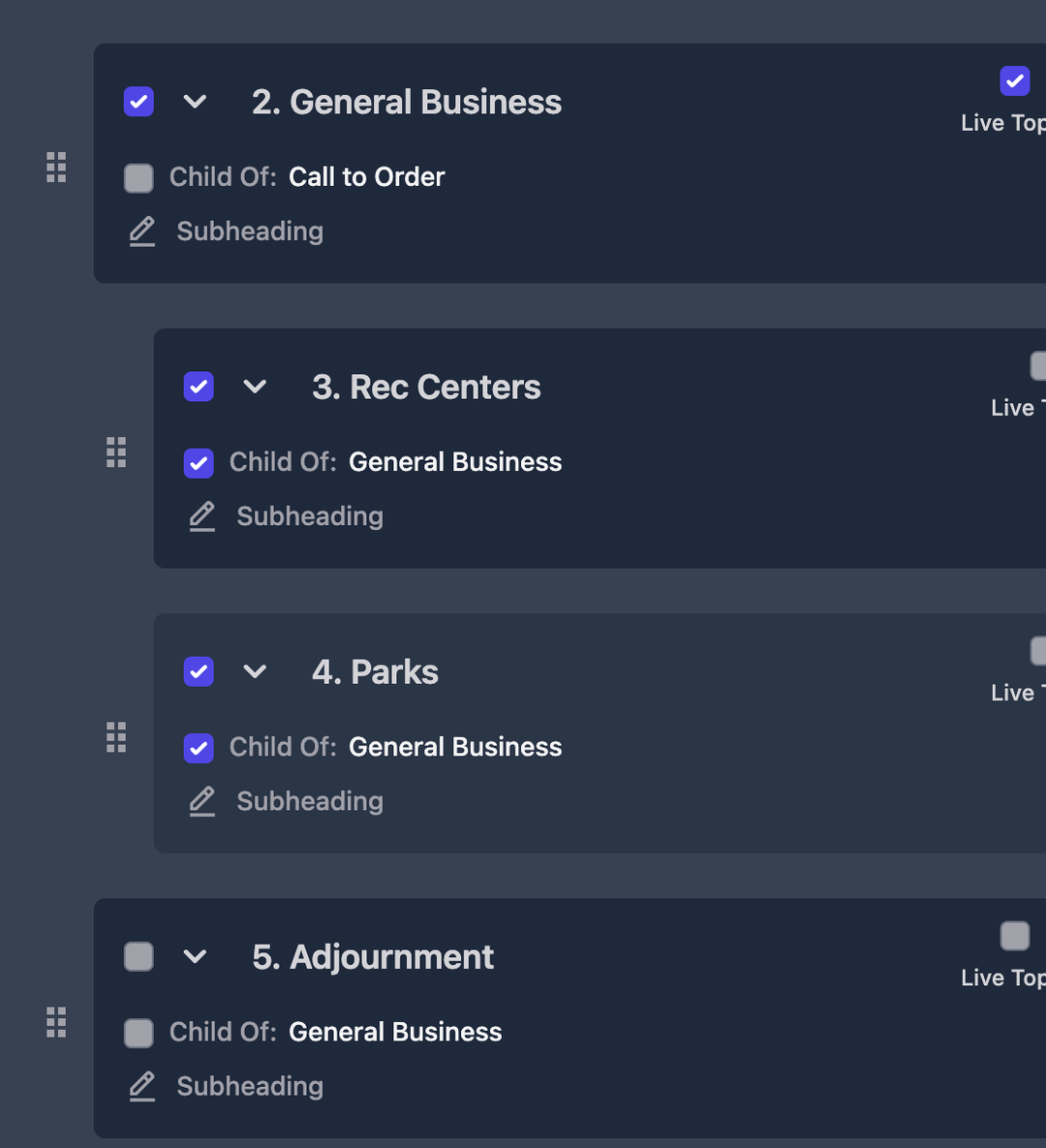
When viewing the published agenda information, groups that are children of a parent group are indented to signify they are a child of the group. Throughout the platform when something is assigned to a group that is a child to another group it will state the name of the parent with a - followed by the name of the group it's assigned to.
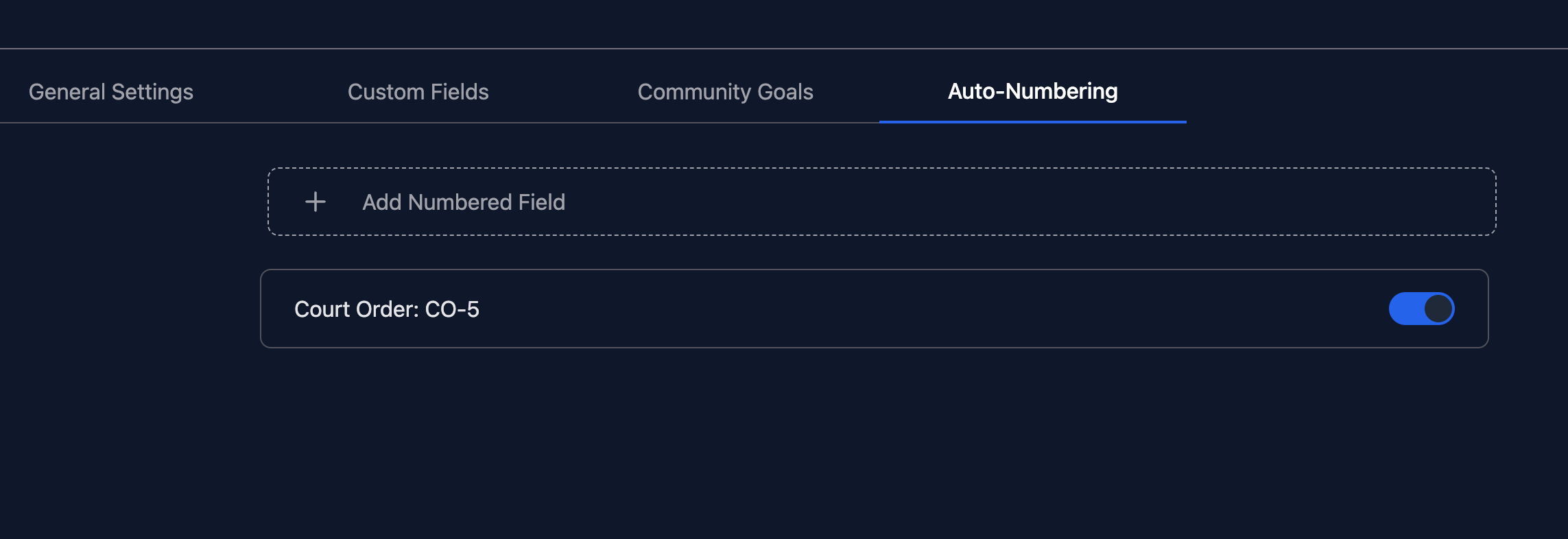
Numbered Fields (BETA)
We've added a new capability allowing you to create custom auto-numbering fields. You can create its name, a custom prefix, and starting number. We are still learning how clients want to use these fields. If you want to utilize a numbered field, please reach out to support about how you would like to use them. As we gather this information it will help us further build out their functionality and how you utilize them.
Live Meetings
- The "Fail Motion" option is now visible all the way until you start a vote. So that way if you have a motion and a second, but then the second is withdrawn you can fail that motion instead of previously having to do a vote to clear it out.
Misc
- Data Optimizations
- Minor UI Tweaks
- Automated notification emails were starting to get quarantined by Microsoft due to a url they were deeming as a phish link. That link has been removed to prevent future emails from not being fully delivered.
Enhancments Release 6.20
May 4, 2025
Board Portal / Live Meetings
Board members can now add annotations to any attachment of a topic. These annotations are then visible to them during a live meeting in the middle of their screen as well. (Annotations added by a member aren't visible by anyone else)
- ** Please note, seeing annotations during a live meeting currently is only supported by devices other than BrightSign digital signage players until we finish testing on those players to make sure it doesn't cause the players to crash.
- If using a supported device you will need to update the URL being used on the devices. You simply need to replace "/signage/dais" with "/signage/v7". Once you change the url then it will utilize the Adobe PDF renderer and put the members annotations over any pdf they have annotated via the board portal.
- If you are using "/signage/local" there is no URL change necessary.
Bookmarks
We've added an all new ability for both platform users and board members through the board portal allowing you to bookmark individual items and then quickly access them from the new "Bookmarks" section of the app.
For board members via the board portal, they will see the bookmark icon when they open up information on a topic next to the print icon
For platform users, there are two ways to bookmark a topic
- First is by using the quick action menu via the topics section. There will see a new "Bookmark" option.
- Second is under "File" when you have a topic open.
Bug Fixes
- During a live meeting if a user was viewing items within consent and were looking at an attachment but then would change which topic and the topic they switched to didn't have any attachments it could cause the previous attachment to get stuck (or throw an error) on the screen and not show the report for the newly chosen topic.
Misc Release 6.19
April 27, 2025
Memo Templates
We've added the ability to inject the meeting type field from a meeting into your template
Minutes
When viewing a meeting's video from your minutes, there are now 10 second jump buttons in the video player.
Misc
- You can now manage the list of email subscriptions used to send out notifications when agendas are published. This list will contain the emails of those who used the Notify Me at the top of our public portal, plus you can add your own, and delete any you wish. To access the list go to "Settings" => "Subscribers"
- Added the ability to turn off the "Description" field on topics. Go to "Settings" => "Topics" and you will see the toggle where you can turn it off now if you don't want use it.
- When linking external google docs into attachments it will now use a google drive icon and when you click on the attachment it will open in a new tab in order to follow google authentication in your browser.
- Squashed a few bugs
- API Optimizations